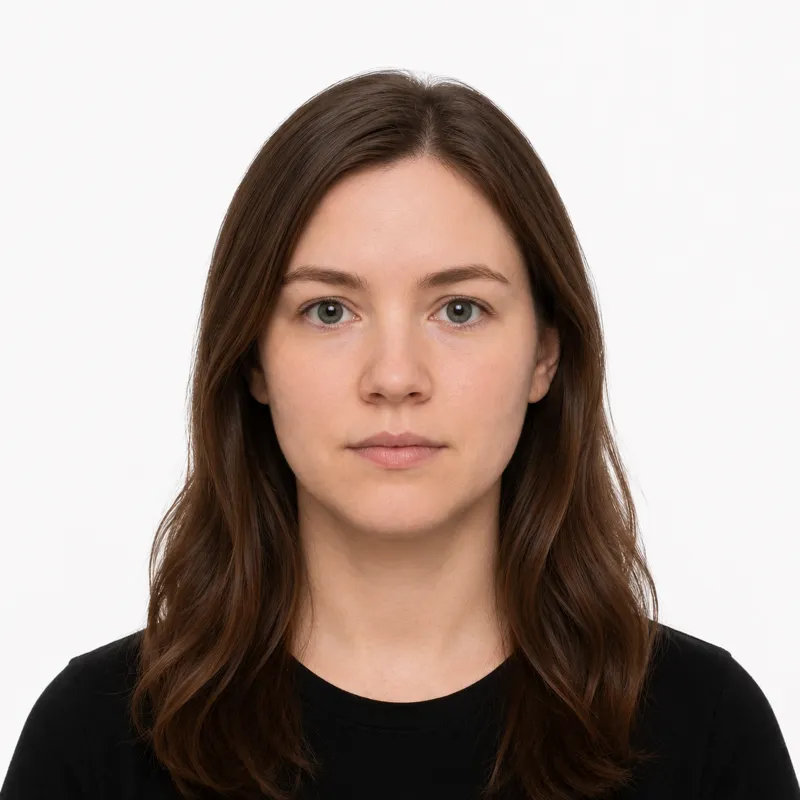
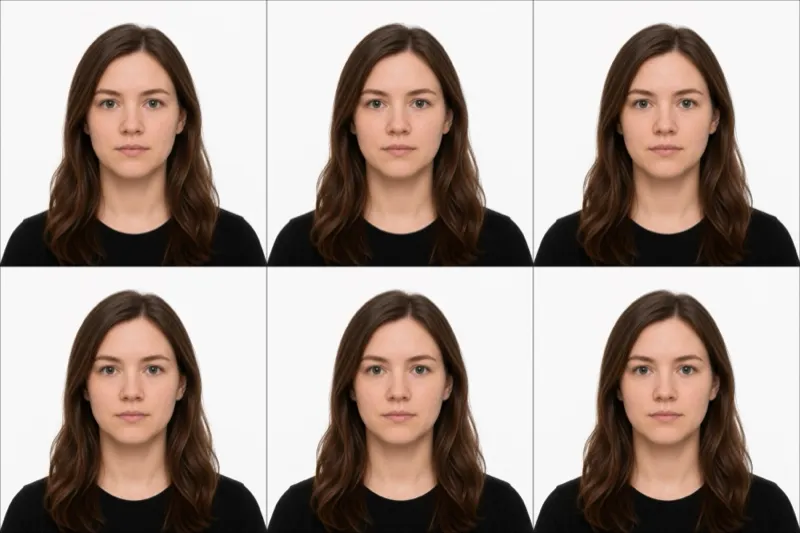
The official requirements
- Size: 35×45 mm, portrait (the ICAO standard, not the US 2×2 inch square)
- Background: plain white only, no off-white, cream, grey, or blue tint
- Head size: the face must fill 70–80% of the photo height (roughly 25–35 mm chin to crown)
- Expression: neutral, mouth naturally closed, both eyes open looking straight at the camera
- Glasses: allowed, but lenses must be clear with no glare or reflection over the eyes
- Headwear: not permitted, except for religious coverings worn daily (face must remain fully visible)
- Recency: taken within the last 3 months (see below, ICA verifies this from the file)
- Color: color photo only, no filters, no facial edits
- Print finish: matte or semi-matte photo paper (non-reflective)
For digital submission through MyICA, upload a JPEG, JPG, PNG, HEIC, or HEIF up to 8 MB. The recommended pixel size is 400×514.
The 3-month rule ICA reads from metadata
Most countries ask for a photo taken within 6 months and take your word for it. Singapore is stricter on both counts. ICA requires the photo to be no more than 3 months old, and it does not rely on the honour system: the portal reads the file’s metadata (the EXIF capture date) to verify when the photo was actually taken.
The practical consequence is specific to Singapore: you cannot re-submit a photo that passed last year, and you cannot back-date a file by renaming it. If the embedded capture date is older than 3 months, the upload is rejected regardless of how compliant the image itself looks. Take a fresh photo for each application, and if you edit or re-export it, use a tool that preserves the original capture date rather than stamping today’s date onto an old shot.
How to take a compliant photo
A recent phone camera is more than enough. Singapore passport photos fail on background, lighting, and head size, not on camera quality. The setup that works:
- Stand about 1.5–2 metres in front of a plain white wall, with space behind you so no shadow falls on the wall.
- Face a window for soft, even daylight from the front. Avoid overhead downlights and on-camera flash, both cause the shadows and lens glare ICA rejects.
- Have someone else take it from chest height, straight on. Selfies distort the face and get flagged.
- Look directly at the camera with a neutral expression. Hair clear of the eyes and eyebrows, ears visible if your hair allows.
- Crop to a 35×45 mm portrait with your head sized so the face covers 70–80% of the frame, or upload the shot to a tool that crops to the ICA size and checks the ratio for you.
Why photos get rejected
ICA returns the same handful of faults. Each one, and the fix:
- Background not truly white: a magnolia HDB wall, a cream studio backdrop, or a faint blue tint all read as off-spec. Use a white wall or replace the background.
- Photo older than 3 months: ICA reads the EXIF date and will reject a stale photo. Re-shoot, do not re-upload an old file.
- Glasses glare: a reflection across the eyes is an automatic fail even when the lenses are clear. Tilt the chin or remove the glasses.
- Wrong dimensions: anything other than 35×45 mm in print, or 400×514 pixels for digital. Crop to the ICA spec, not the US or HK format.
- Edited or filtered photo: beauty modes, skin smoothing, and any retouching of facial features fail. Submit the unedited frame.
- Shadows on face or background: uneven lighting or a shadow behind the head. Move away from the wall and light yourself from the front.
- Head too small or off-centre: re-frame so the face fills 70–80% of the height with clear headroom above the crown.
MyICA upload vs biometric capture
Whether you supply a photo at all depends on how you apply, and Singapore’s routes split cleanly.
MyICA online (e-Passport via SingPass). Most adult renewals go this way. You upload one digital photo (JPEG, JPG, PNG, HEIC, or HEIF, up to 8 MB, recommended 400×514 pixels). The portal runs an automated check at upload, including the metadata recency check above, though staff may still request a replacement on review.
ICA Building (in-person). For first-time adult passports, or applicants flagged for biometric capture, you visit ICA Building at Kallang Road and the biometric photo is captured at the appointment, so in most adult-renewal cases you do not bring a printed one. Your appointment confirmation states whether a photo is required.
Child applications. These typically require an applicant-supplied digital photo uploaded with the MyICA application, since biometric capture is not used for children below the relevant age threshold. For a child, you always need to make the photo yourself.
Where to get your photo
You can get a Singapore passport photo at a photo studio, a neighbourhood shop, an instant photo booth, or online. Typical options:
| Where | Price (SGD) | Appointment | Speed | Digital file |
|---|---|---|---|---|
| Neighbourhood HDB photo shop | ~S$8–15 | No | Same day | On request |
| Photo studio (Funan, Bras Basah, Chinatown) | ~S$15–30 | Sometimes | Same day | Yes |
| Mr. Click / instant photo booth (MRT, mall) | ~S$10 | No | ~5 minutes | Print only |
| Professional studio (with retouch) | ~S$40–80 | Yes | Same day | Yes |
| Online tool (this site) | US$1 (~S$1.35), or US$5 with the print sheet | No | ~2 minutes | Yes; print sheet in the US$5 pack |
In-person is the safe choice if you want a printed photo on matte paper the same day. Online is cheaper and gives you a JPEG sized for MyICA plus a print-ready 4×6 sheet you can print at any 7-Eleven or photo shop. Whichever route you take, the photo must meet every rule above, including the 3-month metadata check, or ICA holds the application until you replace it.
Babies, kids & special situations
Infants and young children follow the same ICA spec: plain white background, neutral face, both eyes open, no pacifier, no hands or arms in the frame, no toys. Lay the baby on a plain white sheet and shoot from directly above. Eyes open is the hardest part; shoot multiple frames.
Religious head coverings worn daily for religious reasons are permitted, but the face must remain fully visible from forehead to chin and the covering must not cast a shadow on the face.
Glasses are allowed, but any glare or reflection across the lenses is a rejection. If your everyday glasses have thick frames or anti-reflective coating that still catches the light, take them off for the photo.
Medical devices worn daily, such as hearing aids, are accepted as part of your normal appearance.
Ready to skip the studio?
Upload a selfie and get a compliant photo in 2 minutes.
Sources & References
This guide is fact-checked against official government publications and updated regularly to reflect the latest requirements.
- [1] ICA Photo Guidelinesica.gov.sg