The official requirements
HMPO expects a light grey or cream background, not the bright pure white most people assume, and its automated checker enforces that alongside every other rule below:
- Size (printed): 35×45 mm, portrait orientation
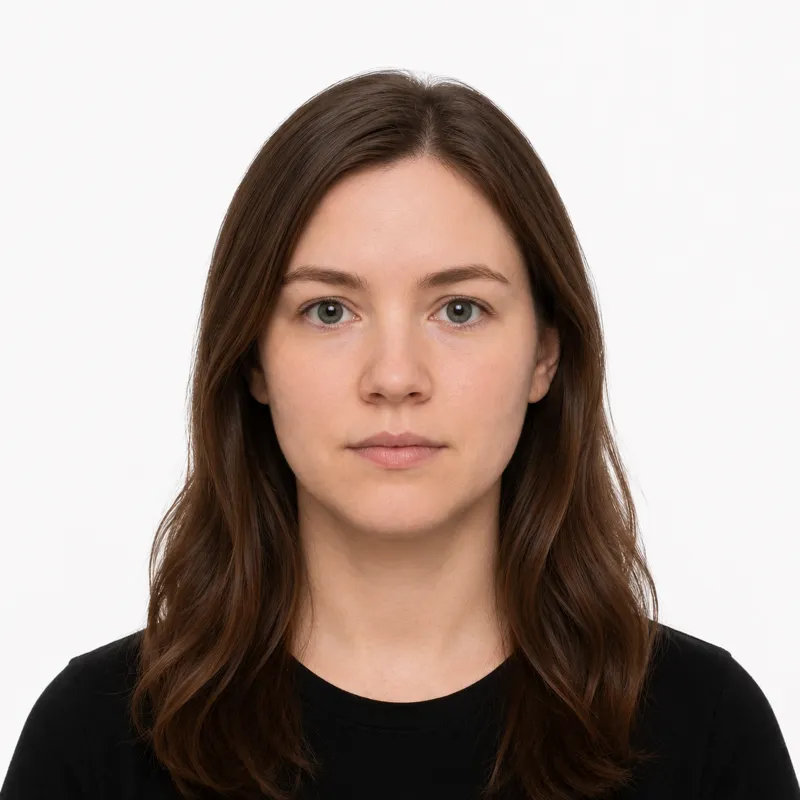
- Background: plain, light-coloured — light grey or cream is what HMPO actually expects, not a bright pure white
- Head size: 29–34 mm from chin to crown
- Expression: neutral, mouth closed, both eyes open and looking straight at the camera
- Glasses: only if you must wear them all the time. Frames must not cover any part of your eyes and there must be no glare on the lenses. Tinted or sunglasses are not allowed.
- Recency: taken within the last month and a true likeness of you today
- Colour: colour photo with natural skin tones, no filters, no red-eye
For an online application, the digital file must be a JPEG, at least 600×750 px, between 50 KB and 10 MB. HMPO runs an automated photo check at upload that flags shadows, glare, wrong head size and incorrect background before you can submit.
How to take a compliant photo
A modern phone camera is good enough — UK passport photos fail on background colour, lighting and head size far more often than on camera quality. The setup that works:
- Stand about 1.5–2 metres in front of a plain light-grey or cream wall, with the same distance between you and the wall so you don’t cast a shadow on it. A pure white wall is the most common trap — HMPO’s checker treats it as too bright and bounces it.
- Face a window. Natural, even light from the front avoids the under-eye and under-nose shadows that overhead lighting creates.
- Have someone else take it. Selfies distort facial proportions and almost always frame the head wrong for the 29–34 mm rule.
- Look straight at the camera, neutral expression, mouth closed, both eyes fully visible. Tuck hair behind your ears if it covers your face.
- Crop to 35×45 mm proportions with the head sized correctly — or upload the shot to a tool that crops to spec and validates it before you submit the file to HMPO.
Why photos get rejected
HMPO’s automated checker and the human reviewers behind it bounce the same handful of problems again and again. Each one, and the fix:
- Wrong head size — head must measure 29–34 mm from chin to crown. Re-shoot from the right distance, or re-crop.
- Background not plain or wrong colour — light grey or cream is what HMPO wants; pure white reads as too bright, and any pattern, picture rail or door frame fails outright.
- Hair covering the eyes — both eyes must be clearly visible. Pull hair back.
- Expression not neutral — smiling, mouth open, or a raised eyebrow gets bounced. Relax the face, mouth closed.
- Shadows — on the face or on the wall behind you. Move further from the wall and light yourself from the front.
- Glare on glasses — if you wear them, frames must be clear of the eyes and there must be no reflection on the lenses. If you can’t get a clean shot, take them off.
- Filters or red-eye — turn off beauty filters; HMPO rejects any edit that changes your appearance.
- Photo older than one month — the UK recency rule is unusually strict. A photo from last year will be rejected even if you look the same.
What to wear (and not wear)
Because HMPO wants a light-grey background, the wardrobe mistake UK applicants hit most is a white top that vanishes into it; a navy, dark grey, or black top fixes it.
Avoid: hats or caps, headphones or earbuds, tinted or sunglasses, uniforms, anything that obscures the face or hairline, and that white-on-light top.
Fine: normal everyday clothing, light makeup that doesn’t change your everyday look, religious head coverings worn daily as long as the full face is visible from forehead to chin and ear to ear, and medical devices like hearing aids.
Where to get your photo
You can take the photo yourself and upload it, pay a booth, or have a high-street photographer or pharmacy shoot and supply both the file and prints. Prices and trade-offs:
| Where | Price (GBP) | Appointment | Speed | Acceptance guarantee |
|---|---|---|---|---|
| Post Office (Check & Send / photo) | ~£10–12 | No | Same day | Yes — digital code included |
| Boots | ~£11.99 | No | Same day | Yes |
| Snappy Snaps | ~£9.99 | No | Same day | Yes — digital code included |
| Photo-Me booth (stations, supermarkets) | ~£6–7 | No | ~5 minutes | Photo only — no HMPO check |
| Photo studio | ~£20–30 | Yes | Same day | Yes |
| Online tool (this site) — print at home or kiosk | $1.00 (~£0.80) | No | ~2 minutes for the file | Money-back if rejected |
The Post Office, Boots and Snappy Snaps all sell the photo with a digital photo code — a 16-character code you paste into the online passport application instead of uploading a file. Photo-Me booths are cheapest in person but don’t review against HMPO rules, so the saving disappears the moment you have to re-shoot. Online is cheapest if you already have a usable shot; you upload the JPEG directly to GOV.UK and skip the code step entirely.
Submitting your photo
Almost everyone now applies online on GOV.UK (uploading a JPEG or pasting a 16-character digital photo code), with a paper PD2 route reserved for those who can’t, where you post two printed photos instead.
Online application (GOV.UK). This is the default for first-time applications, renewals and child passports. You either upload a JPEG directly (at least 600×750 px, between 50 KB and 10 MB) or enter a 16-character digital photo code from a Post Office, Boots or Snappy Snaps. The system runs an automated check on the file at upload — wrong head size, glare, wrong background or shadows get caught before you pay.
Paper application (PD2). Available only by request, mostly for applicants who can’t use the online route. You submit two identical printed photos — one is signed on the back by a countersignatory from the eligible list, the other is left unsigned.
Countersignatory rule. For most first applications and replacements, a countersignatory — someone of good standing who has known you for two years — must confirm your identity and, on paper, sign the back of one photo. Online applications handle this electronically.
Babies, children and special situations
Babies and infants follow the same size, background and expression rules as adults — no dummies, no toys, no hands in the frame. Lay the baby on a plain light-grey or cream sheet and shoot from above. The mouth-closed and eyes-open rules are relaxed for newborns; HMPO accepts a sleeping newborn but not an older baby who can sit up.
Children under 6 don’t need to be looking directly at the camera, but their mouth must still be closed and their face fully visible.
Religious head coverings are allowed if worn daily for religious reasons; the full face must be clearly visible from forehead to chin and ear to ear.
Glasses are only accepted if you must wear them all the time for medical reasons — and even then, the no-glare and no-frame-on-eyes rules apply. If you can’t get a clean shot, take them off. Tinted lenses and sunglasses are never allowed.
Medical devices such as hearing aids, oxygen tubes and head supports worn daily are fine and don’t need an extra statement.
Ready to skip the studio?
Upload a selfie and get a compliant photo in 2 minutes.
Sources & References
This guide is fact-checked against official government publications and updated regularly to reflect the latest requirements.
- [1]
- [2]