US Passport Photo Size & Dimensions for 2026
US passport photo must be 2x2 inches (51x51 mm). Learn exact dimensions in pixels, cm, and mm, plus head size, digital requirements, and how to get it right.
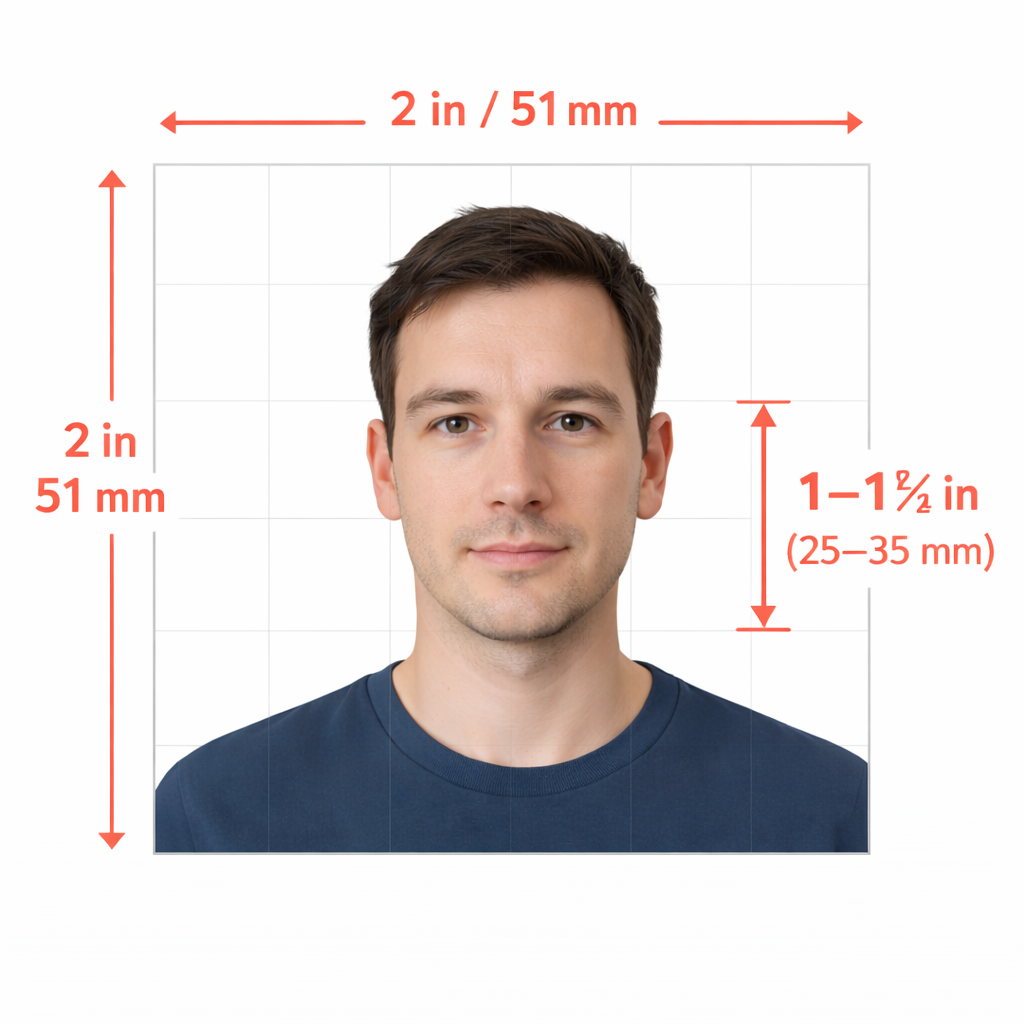
The US Department of State gives specific information about passport photo dimensions, leaving no margin for error.
If your photo deviates from the guidelines, your passport application will be rejected — and you’ll need to start the process over.
Not to worry.
In this article, we’ll walk you through all the acceptable dimensions for passport-size photos and ratios, so you don’t lose any sleep worrying about passport photo size rules.
Get a compliant passport photo for $1 with 1 Dollar Passport Photo:
- Upload a selfie or any photo
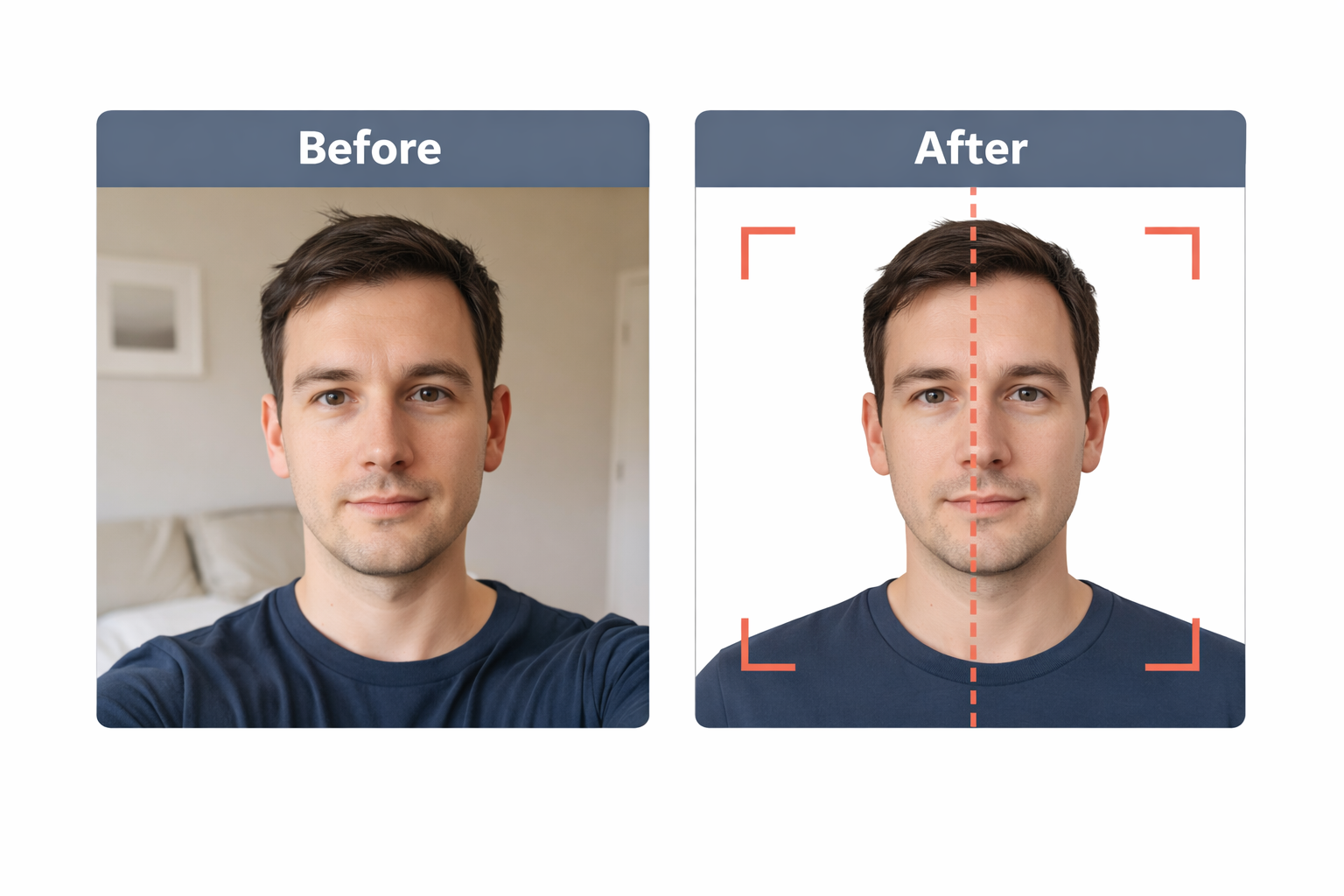
- Our AI crops, resizes, removes the background, and validates compliance
- Download a high-res digital JPEG or a print-ready 4x6 template with 6 photos
And here are some related guides you may want to check out:
- How to Take a Passport Photo on iPhone
- How to Get a White Background on Your Passport Photo
- Print Passport Photo at Home: 4x6 Template Gets 6 Photos for $0.35
What Is the Size of a Passport Photo in the US?
The correct size of a US passport photo is 2 x 2 inches (51 x 51 mm).
According to the US State Department, that’s the only acceptable size. Here’s a summary of all passport-size photo dimensions:
| Unit | Width | Height |
|---|---|---|
| Inches | 2 in | 2 in |
| Millimeters | 51 mm | 51 mm |
| Centimeters | 5.1 cm | 5.1 cm |
| Pixels (at 300 DPI) | 600 px | 600 px |
The head must measure 1 to 1 3/8 inches (25–35 mm) from the bottom of the chin to the top of the head. That means the head should occupy 50% to 69% of the total image height.
Note: All ID photos in the US — including passport, visa, and green card pictures — must be 2 x 2 inches (51 x 51 mm) and follow the same requirements.
For further clarification, look at the following photo composition template based on the US Department of State’s photo sizing guidelines:
A non-compliant passport picture is the number one reason why passport applications get rejected in the US. Incorrect dimensions are one of the most common mistakes.
Still —
A 2x2 inch picture is not the correct passport size in many countries.
For instance, most European nations require 35x45 mm photos for their travel documents. Here’s how the US compares:
| Country | Photo Size |
|---|---|
| United States | 2 x 2 inches (51 x 51 mm) |
| UK | 35 x 45 mm |
| Canada | 50 x 70 mm |
| EU / Schengen | 35 x 45 mm |
| India | 51 x 51 mm (same as US) |
| Australia | 35 x 45 mm |
To ensure passport photo compliance outside the United States, consult the official requirements of the country you’re applying in — or use our tool, which supports 50+ document types with the correct dimensions for each.
US Passport Photo Size in Pixels: Digital Images
What if you’re renewing your passport online?
In that case, you need a digital image.
Unlike printed photos that express their size in inches or millimeters, pixels are used to describe the correct digital passport photo size. The size in pixels is one of the factors that determines whether your photo can be uploaded successfully.
The table below lists all the requirements for digital passport photos:
| Requirement | Value |
|---|---|
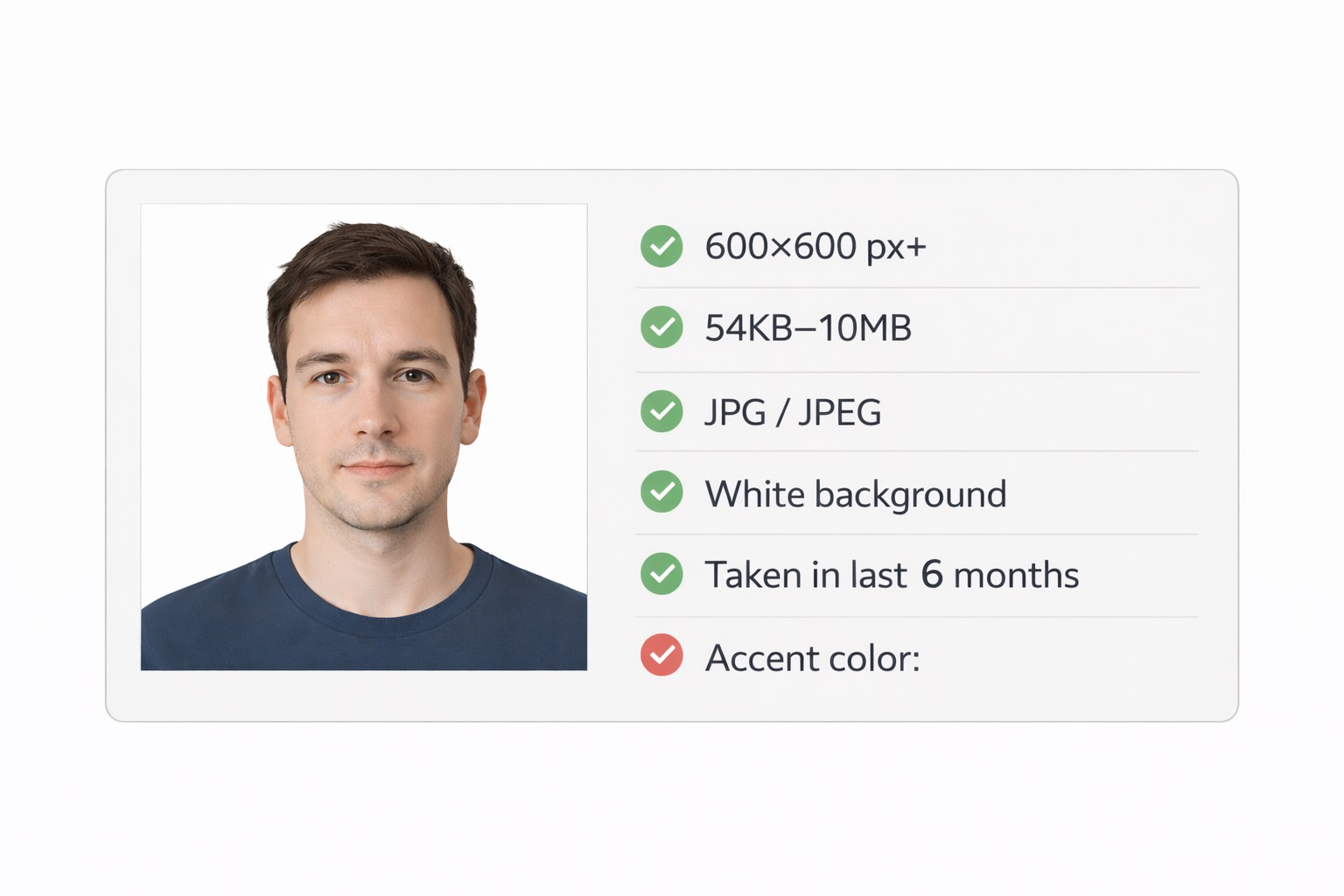
| Size in pixels | 600 x 600 px minimum |
| Maximum size | 1200 x 1200 px |
| Aspect ratio | 1:1 (square) |
| File format | JPEG (.jpg) |
| Compression ratio | 20:1 or less |
| File size | Between 54 KB and 10 MB |
| Head size | 56–69% of the image’s height |
| Color space | 24-bit sRGB |
No need to worry if your digital photo needs cropping. Our tool automatically crops, resizes, and validates head proportions — all in your browser.
What does this mean in practice? Any modern smartphone camera exceeds these pixel requirements. A 12MP phone shoots at roughly 4000x3000 pixels — far more than needed. The photo just needs to be cropped to a square and sized correctly.
Printed Photo Size Requirements
If you’re mailing your application or applying in person at an acceptance facility, you’ll need physical prints. Here are the requirements:
- Paper size: 2 x 2 inches exactly
- Paper type: Matte or glossy photo paper (both accepted)
- Print quality: 300 DPI minimum
- Quantity: 2 identical photos
The 4x6 Print Trick
You don’t need special 2x2 inch paper. Most people print their passport photos on standard 4x6 inch photo paper, which fits 6 passport photos on a single sheet.
Printing a 4x6 at CVS, Walgreens, or Walmart costs $0.35–$0.50. That gives you 6 photos for under 50 cents — compared to $15–$17 for their passport photo service.
Our tool generates this 4x6 template automatically. Learn how to print at home →
What Else to Consider Besides the Size?
While passport photo size is an important factor, it’s not the only one.
When taking a passport photo, also consider the following requirements:
- A plain white or off-white background — here’s how to get one
- A neutral facial expression — smiling may cause rejection
- Good lighting — avoid shadows on your face or background
- Your full face must be visible, head centered, facing the camera directly
- No head coverings, unless for religious or medical reasons
- No glasses — the State Department removed the glasses exemption in 2016
- The photo must be less than 6 months old
Our AI checks all of these automatically when you upload your photo — not just the dimensions.
How to Get the Right Size Every Time
You have three options:
Option 1: Professional Service ($15–$17)
Places like CVS, Walgreens, and USPS take your photo and guarantee it meets size requirements. You’ll pay $15–$17 for two printed photos.
Option 2: DIY With Manual Cropping (Free but risky)
Take your own photo and crop it manually in a photo editor. You’ll need to:
- Set the crop to exactly 1:1 ratio
- Measure head height manually (1 to 1 3/8 inches)
- Estimate eye position (56–69% from bottom)
- Hope you got it right
Option 3: Use Our Tool ($1)
Upload any photo — selfie, portrait, even a photo taken against a colored wall:
- AI removes the background and replaces it with compliant white
- Face detection measures head size and eye position automatically
- Auto-crops to 2x2 inches with correct head-to-frame ratio
- Validates all requirements — not just size, but background, expression, shadows
- Outputs both formats — 600x600 digital JPEG + 4x6 print template with 6 photos
No guessing. No manual measurement. $1.
Passport-Size Photo Dimensions: Key Takeaways
When getting US passport photo prints, remember:
- The correct size is 2 x 2 inches (51 x 51 mm), with a square aspect ratio
- Head height must measure between 1 and 1 3/8 inches (25–35 mm)
- See how to print passport photos on 4x6 paper for just $0.35
When it comes to digital passport photo dimensions, keep in mind that:
- The photo must be at least 600 x 600 pixels in JPEG format
- Your head must occupy 50–69% of the total picture height
- File size must be between 54 KB and 10 MB
Passport Photo Size FAQ
What’s the American standard for passport photos?
The US standard is 2 x 2 inches (51 x 51 mm). The head must be 1 to 1 3/8 inches (25–35 mm) from chin to top of hair. For digital submissions, the minimum is 600 x 600 pixels in JPEG format. This same standard applies to US visa and green card photos.
What’s the passport-size photo ratio?
The ratio must be 1:1 (square). A US passport photo is 2 x 2 inches — equal width and height. Photos that are even slightly rectangular will be rejected. When cropping, always lock the aspect ratio to 1:1.
What’s the difference between “passport photo” and “passport-size photo”?
“Passport-size photo” is an informal term that means different things in different countries. In the US, it means 2x2 inches. In the UK and Europe, it typically refers to 35x45mm. Always check the specific requirements for the document you’re applying for.
Can I resize a 35x45mm photo to 2x2 inches?
Not recommended. The 35x45mm format is a different aspect ratio (not square), so resizing would either stretch the image or require cropping that changes the head-size proportions. Start fresh with a square crop instead.
What DPI should a passport photo be?
300 DPI is the standard for printed passport photos. For digital submissions, the State Department specifies pixel dimensions (600x600 minimum) rather than DPI, since DPI only applies to printing.
Is a US visa photo the same size as a passport photo?
Yes. US visa photos, green card photos, and passport photos all follow the same 2 x 2 inch (51x51mm) specification with identical head-size requirements.
Get the Right Dimensions — Automatically
Stop measuring pixels and calculating head-to-frame ratios. Upload your photo and get correctly sized output in under a minute.
Create your US passport photo →
- Exact 2x2 inch output with correct head size
- Digital file (600x600px) + print template (4x6 with 6 photos)
- All State Department requirements validated automatically
- Just $1
Ready to create your passport photo?
Get a compliant photo in 2 minutes for just $1. No signup required.