How to Print Passport & ID Photos Yourself (2026)
You don't need to pay $17 at a store counter. Print your own passport, visa, or ID photos at any drugstore or grocery store kiosk for $0.35. Here's exactly how.
The $0.35 Trick
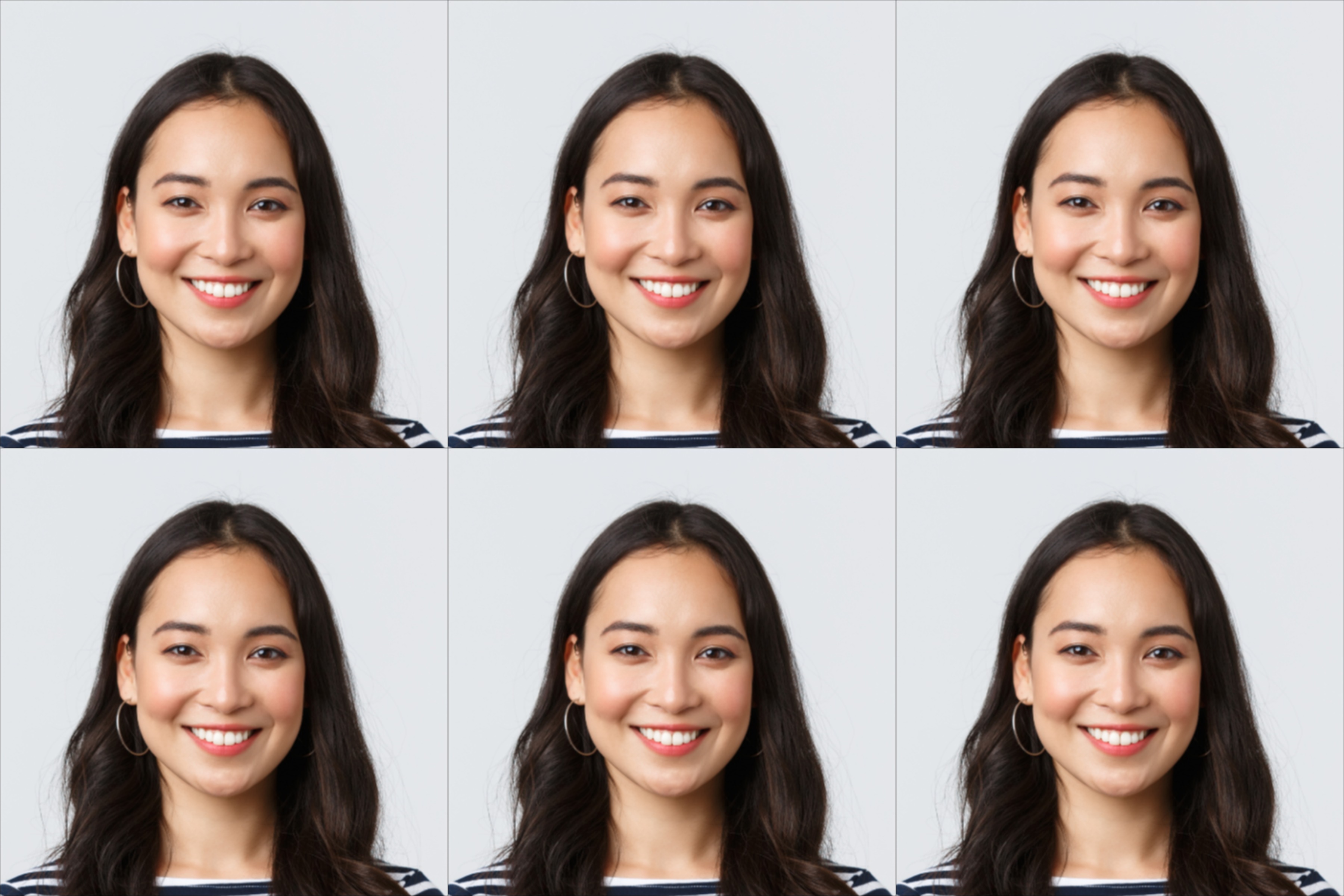
Create your photo online for $1 (we give you a 4×6 sheet with 6 photos). Print it at any store with a photo kiosk for $0.35. Works for passports, visas, green cards, and all ID photos.
Yes, you can print your own passport photos
The US State Department accepts photos you take and print yourself — there’s no rule requiring a store or photographer. As long as the photo meets the official specs (2×2 inches, white background, photo-quality paper), it doesn’t matter where it was printed. Thousands of people do this every day.
The Idea
Every drugstore, grocery store, and warehouse club has a photo kiosk that prints any 4×6 image for $0.17-$0.38. It doesn’t matter what’s on the image — a vacation photo, a birthday cake, or six passport photos arranged in a grid.
1 Dollar Passport Photo creates that grid for you: 6 compliant 2×2 inch passport photos on one standard 4×6 sheet. You print it as a regular photo. The store doesn’t even know it’s a passport photo — you’re just printing a 4×6.
This works for all US document photos — passport, visa, green card, student ID — anything that requires 2×2 inches.
3 Steps, 5 Minutes, $1.35
Step 1: Create your print-ready file ($1)
Upload any photo to 1 Dollar Passport Photo. We remove the background, crop to 2×2 inches, validate against State Department requirements, and arrange 6 photos on a 4×6 sheet. This is what you get:
Step 2: Print at any drugstore or grocery store ($0.17-$0.38)
Walk into any CVS, Walgreens, Walmart, Target, Costco, or Kroger. Use the self-service photo kiosk. Select “4×6 glossy.” Upload your file. Pay. Done.
Step 3: Cut apart your 6 photos
Cut along the crop marks with scissors or a paper cutter. Each photo is exactly 2×2 inches. That’s it — you’re done.
Where to Print (and What It Costs)
| Store | 4×6 Price | Pickup |
|---|---|---|
| Costco | $0.17 | Same day (members) |
| Sam's Club | $0.25 | Same day (members) |
| Kroger / Fred Meyer | $0.25-0.50 | Same day |
| CVS | $0.35 | 1 hour |
| Walgreens | $0.35 | Same day |
| Target (CVS inside) | $0.35 | 1 hour |
| Walmart | $0.38 | Same day |
The process is the same at every store:
- Find the self-service photo kiosk (usually near the pharmacy or electronics)
- Select “Print Photos”
- Upload your 4×6 file (via USB, the store’s app, or their website)
- Select 4×6 glossy
- Pay and pick up
The only things that differ are the price and whether you can use an app to order ahead. CVS, Walgreens, and Walmart all have apps that let you upload from your phone and pick up in-store — sometimes faster than using the kiosk.
Don't use the 'Passport Photos' counter service
When you walk in, you’ll see a “Passport Photos” service advertised for $14.99-$16.99. That’s for people who need the store to take the photo for them. You already have the digital file — just use the self-service kiosk and print a regular 4×6 for $0.35.
Print Quality Tips
Always select glossy — the State Department accepts both glossy and matte, but glossy is standard and reproduces colors better.
Always print 4×6 — don’t resize or scale the file. 1 Dollar Passport Photo formats it for exactly this size.
Don’t use home printers — store kiosks use dye-sublimation printing (same as professional photo labs). The result is waterproof, smudge-proof, and fade-resistant. Home inkjet prints can smear, show dot patterns, and cost more in paper + ink than a $0.35 kiosk print.
Cutting Your Photos
After printing, cut the 6 photos apart along the crop marks. Use a ruler to verify each one is exactly 2×2 inches.
A paper cutter gives the cleanest edges — many libraries and office supply stores (Staples, Office Depot) have them for customer use. Scissors work fine too; just cut slowly along a straight edge.
Doing This for the Whole Family? Read This First
Most families figure this out the hard way.
You go to CVS for your photo. Then again for your spouse’s. Then again for your kid’s. Three separate trips, three separate orders at $16.99 each — $50.97 before you even get to the youngest child. A family of 4 at CVS counter prices runs $67.96. And each order gives you 6 identical photos of one person — so you end up with 24 photos total and only need 8. Sixteen photos go straight in the trash.
Then there’s the baby problem. Many store staff refuse to photograph infants — the baby won’t hold still, the lighting is wrong, the angle is off. Parents describe taking 70 shots at home just to get one usable frame, then driving to three different locations because the first two stores turned them away.
There is a better way to handle this.
The Family Pack — everyone on one sheet
The Family Pack from 1 Dollar Passport Photo is built for exactly this situation. Upload each person’s photo, pick their document type, and get one print-ready sheet with all their photos arranged together — 2 photos per person, zero wasted. One order, one kiosk trip, $0.35 to print.
| Method | Family of 4 Cost | Photos Wasted |
|---|---|---|
| CVS counter — 4 separate visits | $67.96 | 16 wasted |
| Family Pack + store print | $10.35 | 0 wasted |
That is a $57 difference — more than the cost of a passport application fee.
The baby and infant angle matters here too. Because you upload the photo yourself (no store staff involved), you control the shot. Take it at home with natural light, on a white blanket or against a white wall. The Family Pack accepts infant photos the same as anyone else’s. No refusals, no minimum age.
See how the Family Pack works →
Source
Photo printing specifications: U.S. Department of State — Passport Photos
Frequently Asked Questions
Is it legal to print my own passport photo?
Yes. The US State Department accepts photos you take and print yourself, as long as they meet the official requirements for size (2×2 inches), background (white), and quality (printed on photo paper). There is no rule requiring a professional photographer or store service.
Where is the cheapest place to print passport photos?
Costco at $0.17 per 4×6 print (membership required). Without membership: CVS, Walgreens, Walmart, Target, and Kroger all charge $0.35 per 4×6 print. Use [1 Dollar Passport Photo](/us/passport/) ($1) to create a 4×6 sheet with 6 photos, then print at any store. Total: $1.17-$1.35 for 6 photos.
Can I print passport photos at a grocery store?
Yes. Kroger, Safeway, Fred Meyer, and other grocery chains with photo kiosks offer 4×6 prints for $0.25-0.50. Sam's Club and Costco photo centers also work. Same process as any drugstore kiosk.
Can I print passport photos at home?
You can, but store kiosks produce better results for less money. Kiosks use dye-sublimation printers — professional quality, waterproof, smudge-proof. Home inkjet prints can smear and may not meet State Department standards. A kiosk print costs $0.35 — cheaper than photo paper and ink.
Does this work for visa and green card photos too?
Yes. US passport, visa, and green card photos are all 2×2 inches with the same specifications. The same 4×6 print sheet works for all of them. You get 6 photos per sheet.
Glossy or matte for passport photos?
The State Department accepts both, but glossy is the standard. Most store kiosks default to glossy. Avoid textured or canvas finishes.
How do I cut the photos to the right size?
Use scissors or a paper cutter to cut along the crop marks on the 4×6 sheet. Each photo should be exactly 2×2 inches. A paper cutter gives the cleanest edges — many libraries and office supply stores have them available.
Need the Digital Photo First?
Upload a photo, get a print-ready 4×6 sheet with 6 compliant photos. Automatic background removal, size cropping, and compliance checking.
Create Your Photo — $1$1 digital + $0.35 printing = $1.35 total for 6 photos