Green Card Lottery (DV) Photo Requirements: Size, Format & Rules
Exact green card photo requirements for the DV Lottery. Official size, format, pixel dimensions, and rules — plus what changes if you're selected for an interview.
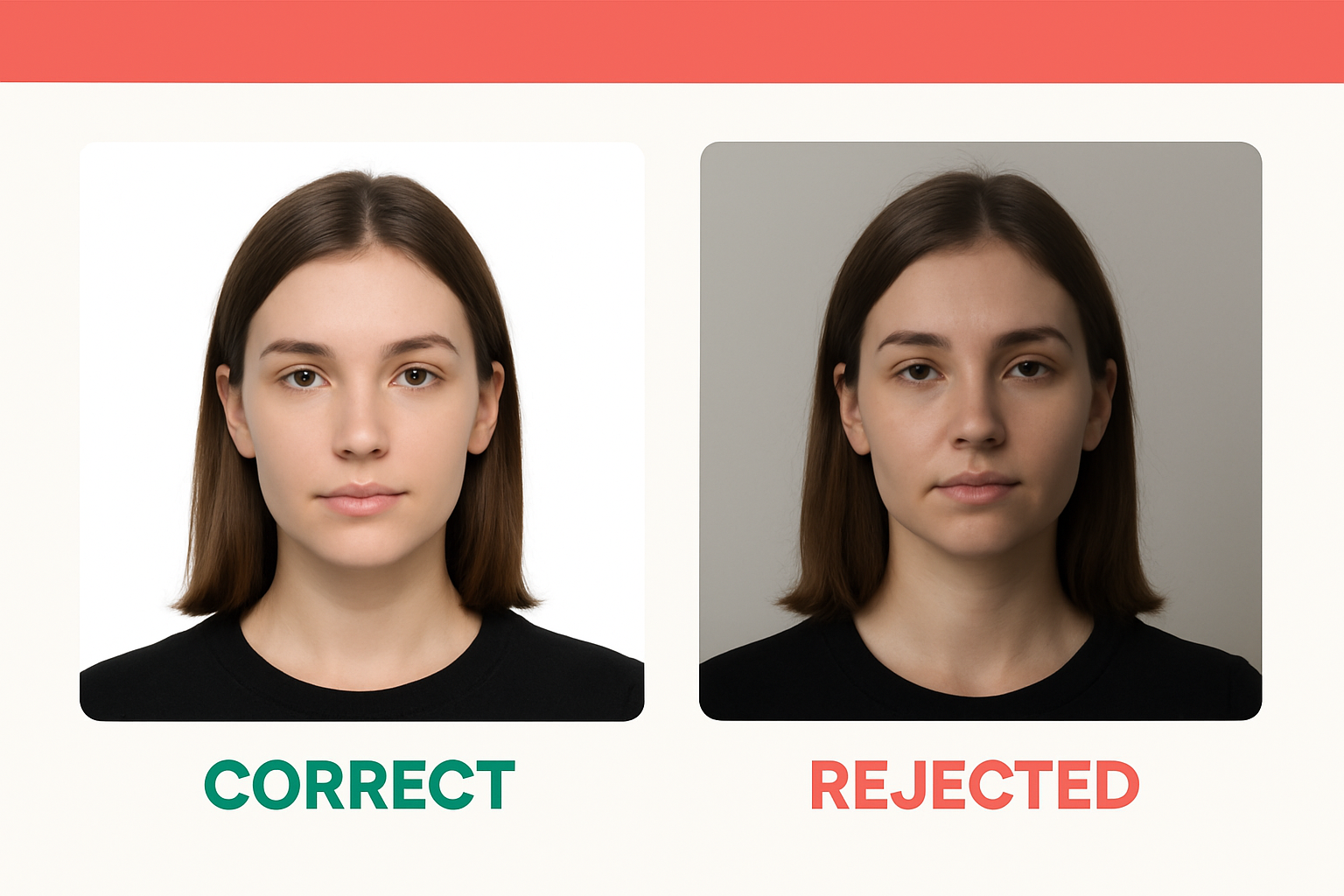
Getting the green card photo requirements wrong is the fastest way to throw away your Diversity Visa lottery entry. The State Department’s system will reject your submission outright — no warning, no second chance during the registration window. If the window closes, you’re done for the year.
The requirements are strict but straightforward. Here’s exactly what you need for both the DV lottery entry and the interview if you’re selected.
DV Lottery Photo Specifications (Digital Entry)
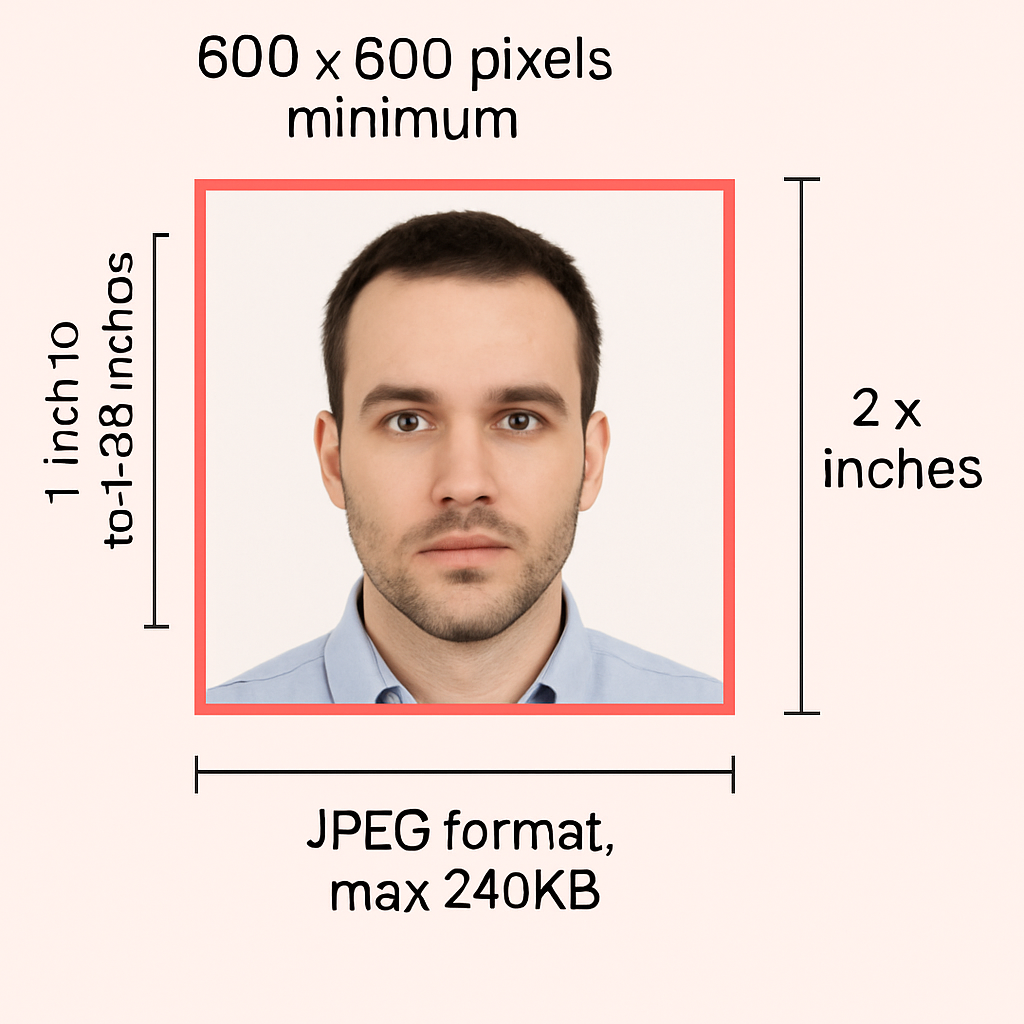
When you submit your entry on the E-DV website, you must upload a digital photo that meets these exact specs:
| Requirement | Specification |
|---|---|
| File format | JPEG (.jpg) only |
| File size | 240 KB (kilobytes) or less |
| Dimensions | Exactly 600×600 pixels |
| Aspect ratio | Square (height equals width) |
| Color depth | 24-bit color, sRGB color space |
| Compression | 20:1 ratio or less |
| Background | Plain white or off-white |
| Recency | Taken within the last 6 months |
Your head (bottom of chin to top of hair) must fill 50% to 69% of the image height. That’s roughly 300 to 414 pixels in a 600×600 photo.
These aren’t guidelines. They’re hard requirements enforced by the upload system.
How DV Lottery Photos Differ from US Passport Photos
If you already have a US passport photo, you might assume it works for the DV lottery. It doesn’t — at least not without conversion.
| DV Lottery Entry | US Passport Photo | |
|---|---|---|
| Format | Digital JPEG only | Printed 2×2 inch |
| Pixel size | 600×600 px (exact) | 600×600 to 1200×1200 px |
| Max file size | 240 KB | N/A (printed) |
| Head size | 50–69% of image height | 1–1⅜ inches (25–35 mm) |
| Background | White or off-white | White or off-white |
| Recency | Within 6 months | Within 6 months |
The core composition rules are identical — same background, same neutral expression, same “no glasses” policy. But the DV lottery has tighter digital specifications. A passport photo that’s 1200×1200 pixels or saved as PNG won’t upload. A 2×2 print is useless without scanning and reformatting.
If you have a recent passport-style photo, you can convert it — but it’s easier (and safer) to just take a new one that meets DV specs from the start.
Green Card Photo Requirements: What Gets Rejected
The DV lottery system uses automated checks. Common rejection reasons include:
- Wrong file format. PNG, HEIC, PDF — anything that isn’t .jpg gets rejected instantly.
- Wrong dimensions. Must be exactly 600×600. Not 601×599. Not 1200×1200.
- File too large. Over 240 KB and the upload fails.
- Head too small or too large. Your head must fill 50–69% of the frame. Too much space above your head or a tight crop that cuts off your chin both fail.
- Glasses. Eyeglasses are not allowed in any US visa photo. Period. The only exception is a documented medical necessity with a signed statement from a physician.
- Shadows on face or background. Even subtle shadows from overhead lighting can trigger a rejection.
- Non-white background. Gray, blue, beige — all rejected. It must be white or off-white.
- Digital alteration. Beauty filters, skin smoothing, background replacement — anything that changes your appearance is grounds for rejection.
- Old photo. If it doesn’t reflect your current appearance, it won’t be accepted — even if it’s technically within 6 months.
The system catches the obvious issues (format, size, dimensions). A consular officer catches the rest later. Either way, a bad photo kills your entry.
What Happens If Your DV Entry Photo Is Rejected
If the E-DV system rejects your photo during submission, you can try again — as long as the registration period is still open. You get one entry per person per year. If you fix the photo and resubmit before the deadline, your latest entry replaces the previous one.
If the registration window closes before you fix it, you’re out for that fiscal year. There’s no appeal, no extension, no exception.
This is why you should prepare your photo before the registration period opens, not the day of.
Photo Requirements If You’re Selected (Interview Stage)
Getting selected is step one. If you win the lottery and are scheduled for a consular interview, the photo requirements shift:
- Two (2) identical printed photos — not digital
- Size: 2×2 inches (51×51 mm)
- Printed on photo-quality paper (matte or glossy)
- Same composition rules — white background, neutral expression, no glasses, head size 50–69%
- Must reflect your current appearance at the time of the interview
These are the same requirements as any US immigrant visa photo. You’ll bring them to the embassy or consulate along with your DS-260 confirmation and supporting documents.
Don’t reuse your original entry photo if more than a few months have passed. Take new ones close to your interview date.
USCIS vs State Department: How Requirements Overlap
Two agencies handle green card processing, and their photo rules are nearly identical:
- State Department handles the DV lottery, consular interviews, and immigrant visa processing abroad.
- USCIS handles adjustment of status (Form I-485) for applicants already in the US.
Both require 2×2 inch photos with white backgrounds, neutral expressions, and no glasses. USCIS uses biometric appointments to capture photos domestically. If you’re processing through a US embassy, you bring printed photos to the interview.
The composition rules are the same regardless of agency. The difference is delivery — digital upload for the lottery entry, printed photos for interviews and forms.
Quick Reference Checklist
Use this before you upload or print:
| ✅ Do | ❌ Don’t |
|---|---|
| Use JPEG format | Use PNG, HEIC, or PDF |
| Exactly 600×600 pixels | Submit wrong dimensions |
| Keep file under 240 KB | Exceed the file size limit |
| Plain white background | Use gray, blue, or patterned backgrounds |
| Neutral expression, both eyes open | Smile, squint, or close eyes |
| Face the camera directly | Turn your head or angle your body |
| Take photo within last 6 months | Use an old or outdated photo |
| Remove all eyeglasses | Wear glasses (even clear frames) |
| Remove hats and head coverings | Wear hats (religious exceptions only) |
| Wear normal daily clothing | Wear uniforms or camouflage |
The Easy Way to Get Your DV Lottery Photo Right
You have two options for creating a compliant photo:
State Department photo tool (tsg.phototool.state.gov/photo) — This free tool crops and resizes your photo to 600×600 pixels. But it’s a cropping tool only. It won’t fix lighting, background color, head positioning, or file format. If your source photo has issues, the tool passes those issues right through.
One Dollar Passport Photo — Upload a photo from your phone and get a compliant image in minutes. The tool handles background removal, proper cropping, correct dimensions, and JPEG formatting automatically. No appointment, no studio visit, no guesswork. It works for DV lottery entries, passport photos, and visa photos.
If you’re entering the DV lottery and want to eliminate the risk of a rejected photo:
One photo. One dollar. Done right the first time.
Frequently Asked Questions
Can I use my existing passport photo for the DV lottery?
Only if it meets the DV-specific digital requirements: exactly 600×600 pixels, JPEG format, under 240 KB, taken within the last 6 months. A printed 2×2 passport photo won’t work — you’d need to scan it at 300 DPI and reformat it. It’s usually easier to take a new one.
Can I take a selfie for the DV lottery photo?
The State Department advises against mobile phone photos due to quality concerns. That said, modern smartphones can produce acceptable photos with proper lighting and a white background. Use the rear camera with a timer or have someone else take it, then run it through One Dollar Passport Photo to handle formatting.
What if I’m selected but my entry photo was borderline?
If your entry was accepted and you’re selected, you’ll need new printed photos for the interview anyway. The interview photos must reflect your current appearance, so take fresh ones close to your interview date.
How recent does the photo need to be?
Within 6 months of submission — both for the initial entry and the interview. If your appearance has changed significantly (major weight change, facial surgery, added or removed piercings/tattoos), you need a new photo even if it’s been less than 6 months.
Do I need photos for my spouse and children too?
Yes. Every person included in your DV lottery entry — you, your spouse, and all unmarried children under 21 — needs their own individual photo meeting the same requirements. Each photo must show only that person.
Can I wear religious head coverings?
Yes. Head coverings worn daily for religious purposes are allowed. Your full face must still be visible, and the covering must not cast shadows on your face.
What if the upload system keeps rejecting my photo?
Check the three most common culprits: file format (must be .jpg), dimensions (must be exactly 600×600), and file size (must be 240 KB or less). If those are correct, check that the background is truly white and your head fills 50–69% of the frame. A dedicated photo tool handles all of these automatically.
Ready to create your passport photo?
Get a compliant photo in 2 minutes for just $1. No signup required.