UK Passport Photo Code: Complete Guide to Digital Passport Service 2026
Everything you need to know about UK passport photo codes - where to get them (Boots £8.99, Post Office £8), how to use them, and how to upload your own photo for FREE instead.
Quick Answer
The UK passport photo code is a 16-character digital code issued when you get passport photos taken at participating locations (Boots, Post Office, Tesco, Snappy Snaps, etc.). This code allows HM Passport Office to access your photo digitally when you apply online for a UK passport renewal or first-time adult passport. You enter the code during your online application, eliminating the need to mail physical photos.
Key Facts:
- Format: 16-character alphanumeric code (e.g.,
ABCD-1234-EFGH-5678) - Validity: 90 days from photo date
- Cost: £5-£15 at participating photo services (code included in price)
- Where to Get: Boots (£8.99), UK Post Office (£8.00), Tesco (£10), Snappy Snaps (£12-£15)
- How It Works: Photographer uploads photo → code issued → you enter code in online application → HM Passport Office retrieves photo
- Alternative: Upload your own digital photo for FREE (no code needed if you meet UK passport photo requirements)
Best Value Option: Take your own compliant photo → upload directly to online application (FREE) instead of paying £5-£15 for code service.
What Is the UK Passport Photo Code?
The UK passport photo code is a digital photo verification system introduced by HM Passport Office to streamline passport applications.
How It Works:
- Photo Taken: You visit a participating photo service (Boots, Post Office, etc.)
- Code Issued: Photographer takes compliant UK passport photo, uploads it to HM Passport Office database, prints photos + 16-character code
- Online Application: You apply for UK passport online at gov.uk/apply-renew-passport
- Enter Code: When prompted for photo, enter 16-character code instead of mailing physical photos
- Photo Retrieved: HM Passport Office automatically retrieves your photo from database using code
- Passport Printed: Photo used for passport without requiring physical photo mail-in
Benefits:
- No mailing physical photos (faster processing, no lost photo risk)
- Automatic compliance check (photographer ensures photo meets UK specs)
- Faster application (skip photo upload step)
- Less rejection risk (professional photos pre-approved)
When Photo Code Is Required:
- Online passport renewal (adults 16+)
- First-time adult passport (18+)
- Child passport renewal (some cases)
When Photo Code Is NOT Required:
- If you upload your own digital photo (FREE alternative)
- Paper application forms (must mail physical photos, no code needed)
- Emergency travel documents
Where to Get UK Passport Photo Code
Participating Photo Services:
1. Boots Passport Photos
- Cost: £8.99 for 4 photos + code
- Locations: 2,200+ Boots stores UK-wide (most offer photo service)
- Processing Time: 5-10 minutes (instant code)
- Quality: Professional lighting, guaranteed UK compliance
- Code Validity: 90 days
- Booking: Walk-in or book online at boots.com/photo/passport-photos
2. UK Post Office
- Cost: £8.00 for 4 photos + code
- Locations: 11,500+ Post Offices (7,000+ offer passport photo service)
- Processing Time: 5-10 minutes
- Quality: Professional setup, guaranteed acceptance by HM Passport Office
- Code Validity: 90 days
- Check-and-Send Service: Some Post Offices offer application checking + photo service (£10.50 total)
3. Tesco Photo Centres
- Cost: £10.00 for 6 photos + code
- Locations: 200+ large Tesco stores with photo centres
- Processing Time: 10-15 minutes
- Quality: Professional, guaranteed compliance
- Code Validity: 90 days
4. Snappy Snaps
- Cost: £12-£15 for 6 photos + code
- Locations: 120+ stores (London, major UK cities)
- Processing Time: 10 minutes
- Quality: Professional photographer, highest quality prints
- Code Validity: 90 days
- Premium Service: Retouching available (additional cost)
5. Other Participating Services
- Max Spielmann: £9.99 for 4 photos + code
- Timpson: £10-£12 for 4 photos + code
- Independent photo studios: £12-£20 (varies by location)
How to Find Participating Locations:
- Search “passport photo code near me” on Google Maps
- Check service websites for store locator (Boots, Post Office have online tools)
- Call ahead to confirm photo code service available (not all branches offer it)
How to Use UK Passport Photo Code
Step-by-Step Application Process:
Step 1: Get Your Passport Photo Code
- Visit participating photo service (Boots, Post Office, Tesco, etc.)
- Photographer takes compliant UK passport photo
- Photo uploaded to HM Passport Office database
- You receive:
- 4-6 printed passport photos (physical copies)
- 16-character code printed on receipt/card
- Write down code (format:
ABCD-1234-EFGH-5678)
Step 2: Start Online Passport Application
- Go to gov.uk/apply-renew-passport
- Create GOV.UK account (if you don’t have one)
- Select application type:
- Renew passport (for existing passport holders)
- First adult passport (for first-time applicants 18+)
- First child passport (under 16)
Step 3: Enter Passport Photo Code
- Fill personal details (name, date of birth, address, etc.)
- When prompted: “How do you want to provide your photo?”
- Select “Use a photo code from a shop or photo booth”
- Enter 16-character code exactly as printed (include hyphens if shown)
- System validates code (checks if photo exists in database)
- If code is valid:
- System retrieves photo automatically
- You see preview of photo on screen
- Confirm photo is correct
- If code is invalid:
- Error message: “Code not found” or “Code expired”
- Check code entry for typos
- If code is older than 90 days, get new photos + code
Step 4: Complete Application
- Fill remaining application details
- Pay passport fee (£88.50 adult renewal online, £100 first-time adult)
- Submit application
- HM Passport Office processes (standard: 3 weeks, fast-track: 1 week)
Step 5: Receive Passport
- Photo from code automatically printed on passport
- No need to mail physical photos
- Passport delivered by Royal Mail (tracked delivery)
UK Passport Photo Code vs. Upload Your Own Photo
Two Options for Online Passport Applications:
Option 1: Passport Photo Code (£5-£15)
How It Works:
- Pay £8-£15 at photo service for photos + code
- Enter code in online application
- HM Passport Office retrieves photo from database
Pros:
- Guaranteed professional compliance (photographer ensures UK specs met)
- Less rejection risk (expert photographer handles lighting, sizing, background)
- No need to crop or format photo yourself
- Instant code (ready to apply immediately)
Cons:
- Costs £5-£15 (vs FREE upload option)
- Requires visiting physical photo service location
- Code expires in 90 days (must apply before expiration)
- Limited to participating locations (not all photo services offer code)
Option 2: Upload Your Own Digital Photo (FREE)
How It Works:
- Take compliant passport photo yourself (smartphone or camera)
- Upload digital photo directly in online application
- HM Passport Office validates photo
Pros:
- Completely FREE (save £5-£15)
- Take photo at home (no travel to photo service)
- Retake as many times as needed (no additional cost)
- No code expiration (use photo immediately or save for later)
Cons:
- Higher rejection risk if photo doesn’t meet specs (35% rejection rate for DIY)
- Must understand UK passport photo requirements (background, lighting, sizing)
- Need to crop/format photo yourself
- No professional guarantee (you’re responsible for compliance)
Which Option Is Better?
| Factor | Photo Code (Paid) | Upload Your Own (FREE) |
|---|---|---|
| Cost | £5-£15 | FREE |
| Rejection Risk | Low (5-10%) | Medium (20-35%) |
| Convenience | Requires store visit | Take at home |
| Speed | 5-10 minutes at store | Varies (multiple retakes possible) |
| Best For | Time-sensitive applications, first-time applicants, people unfamiliar with photo requirements | Budget-conscious, DIY-comfortable, people with good smartphone camera |
Recommendation:
- Use photo code if: You need guaranteed acceptance, applying for first time, not confident in photo requirements
- Upload your own if: You want to save £5-£15, comfortable with DIY, have good camera/lighting setup
UK Passport Photo Requirements (If Uploading Your Own)
If you choose to upload your own digital photo instead of using a code, your photo must meet these exact UK specifications:
Size & Format
- Digital dimensions: Minimum 600 pixels wide × 750 pixels tall (recommended: 1200×1500 pixels)
- Print size: 45mm wide × 35mm tall (if printing for paper application)
- File format: JPEG (.jpg)
- File size: Maximum 10MB
- Head height: 29-34mm from chin to crown (80% of photo frame)
Background
- Color: Plain light grey or cream (NOT white like US passports)
- Prohibited: White backgrounds, patterned backgrounds, colored backgrounds
- Shadow-free: No visible shadows on background or face
Expression & Pose
- Expression: Neutral (mouth closed, no smiling)
- Eyes: Both eyes open, looking directly at camera
- Head position: Face forward, no tilting
- Shoulders: Both visible, facing camera
Glasses & Accessories
- Glasses: NOT ALLOWED (UK banned glasses in passport photos November 2016)
- Headwear: Prohibited (except religious reasons — face must be fully visible)
- Jewelry: Allowed (as long as it doesn’t cover face)
Photo Quality
- Focus: Sharp, clear (no blurriness)
- Lighting: Even, no harsh shadows or glare
- Color: Natural skin tones (no filters, no over-exposure)
- Eyes: No red-eye effect
- Background: Uniform color (no texture, no wrinkles)
Critical UK-Specific Rules
UK passport photos are DIFFERENT from US passport photos:
| Requirement | UK | US |
|---|---|---|
| Background Color | Light grey or cream | Pure white |
| Glasses | NOT ALLOWED (banned 2016) | Allowed (with restrictions) |
| Size | 45mm × 35mm | 2×2 inches (51×51mm) |
| Expression | Neutral (no smiling) | Neutral (no smiling) |
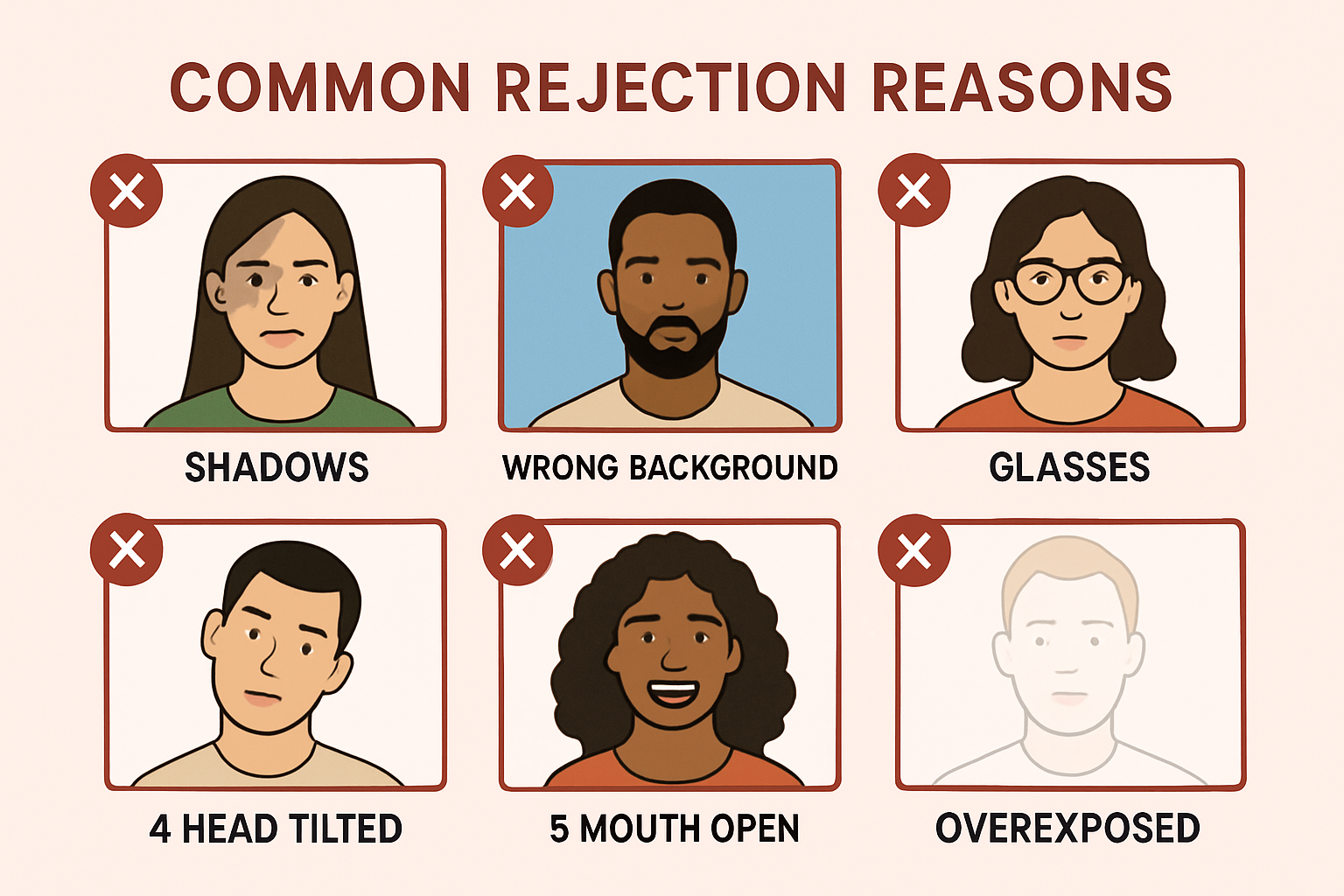
Common UK Photo Rejection Reasons:
- White background (UK requires grey/cream, NOT white)
- Wearing glasses (40% of rejections — glasses banned since 2016)
- Smiling or mouth open (neutral expression required)
- Shadows on face or background (UK very strict about shadow-free)
- Photo too old (must be taken within last month)
How to Take Your Own UK Passport Photo at Home (FREE Method)
If you want to skip the £5-£15 photo code fee, you can take a compliant UK passport photo at home and upload it directly.
Equipment Needed:
- Smartphone or digital camera (8+ megapixels)
- Plain light grey or cream wall/backdrop (or white sheet that photographs as light grey)
- Diffuse natural lighting (window light or softbox)
- Tripod or stable surface (optional)
Step-by-Step Photography:
-
Setup Background:
- Find plain light grey or cream wall (or white wall that photographs as light grey in natural light)
- Position 1-2 feet away from wall (reduces shadows)
- Test background color: Take test photo, check background appears light grey/cream (NOT pure white)
-
Lighting:
- Use natural window light (indirect, not direct sunlight)
- Position subject facing window (light on face)
- NO flash (causes harsh shadows and red-eye)
- Ensure face evenly lit (no shadows on one side)
-
Camera Position:
- Camera at eye level (not above or below)
- Distance: 4-5 feet from subject
- Use timer or remote (avoid camera shake)
-
Subject Positioning:
- Face camera squarely (shoulders level)
- Neutral expression (mouth closed, no smiling)
- Eyes open, looking directly at camera
- Remove glasses (UK does not allow glasses in passport photos)
- Remove hat, headband, hair accessories (unless religious)
-
Take Multiple Photos:
- Shoot 10-15 photos with slight variations
- Check each photo for:
- Light grey/cream background (NOT white)
- No shadows on face or background
- Eyes clearly visible, neutral expression
- Head centered, proper sizing (29-34mm from chin to crown when printed 45×35mm)
Processing & Upload:
- Select best photo (clearest eyes, no shadows, proper background color)
- Crop to UK specs:
- Use online cropping tool: gov.uk/photos/upload (HM Passport Office’s official tool)
- Upload photo → tool automatically crops to 45mm×35mm with 29-34mm head height
- Tool validates background color, lighting, face detection
- Download cropped photo (JPEG format)
- During online passport application, select “Upload your own photo”
- Upload JPEG file (system validates specs)
- If photo passes validation, continue application
- If photo rejected, system provides error message (re-upload corrected photo)
Common DIY Photo Mistakes:
- Pure white background (UK requires light grey/cream)
- Wearing glasses (automatic rejection)
- Flash photography (causes harsh shadows, red-eye)
- Head size too small/large (must be 29-34mm when printed 45×35mm)
- Shadows on background (use diffuse lighting, position away from wall)
Total Cost: FREE (vs £5-£15 for photo code service)
UK Passport Photo Code Expiration & Troubleshooting
Code Expiration
Passport photo codes expire 90 days after photo date.
What Happens If Code Expires:
- Online application rejects code (error: “Code expired”)
- You must get new photos + new code (cannot extend expiration)
- Previous code cannot be reactivated
How to Avoid Expiration:
- Apply for passport within 90 days of getting photos/code
- If planning to apply later, wait to get photos closer to application date
- Set reminder: 80 days after photo date (apply before expiration)
Code Not Working (Troubleshooting)
Error: “Code not found”
Possible causes:
- Typo in code entry — Double-check all 16 characters (case-sensitive, include hyphens if present)
- Photo not uploaded yet — Wait 10-15 minutes after getting photos (photographer may still be uploading)
- Photographer didn’t upload photo — Return to photo service, ask them to verify upload
Error: “Code expired”
Cause: Photo older than 90 days
Solution: Get new photos + new code (no way to extend expiration)
Error: “Photo does not meet requirements”
Cause: Photographer’s photo failed HM Passport Office validation (rare)
Solution:
- Contact photo service (they should retake photo for free — guaranteed compliance)
- If photo service refuses, get refund and try different service
- Alternative: Upload your own digital photo (FREE)
Code Not Accepted by HM Passport Office (After Application Submitted):
Rare cases where code is accepted during application but photo rejected later:
- Photo quality issues (blurry, shadows, incorrect background)
- Technical error in photo upload by photographer
- Photo doesn’t match applicant (wrong person’s photo uploaded)
What to do:
- HM Passport Office will contact you requesting new photo
- You can submit new photo code OR upload digital photo
- Processing paused until photo issue resolved
Cost Comparison: Photo Code vs. DIY Upload
| Method | Cost | Photos Included | Code Validity | Rejection Risk | Total Time |
|---|---|---|---|---|---|
| Boots Photo Code | £8.99 | 4 prints + code | 90 days | 5-10% | 10-15 min (store visit) |
| Post Office Code | £8.00 | 4 prints + code | 90 days | 5-10% | 10-15 min (store visit) |
| Tesco Photo Code | £10.00 | 6 prints + code | 90 days | 5-10% | 15-20 min (store visit) |
| Snappy Snaps Code | £12-£15 | 6 prints + code | 90 days | 5-10% | 10-15 min (store visit) |
| Upload Your Own (DIY) | FREE | Digital only | No expiration | 20-35% | 15-30 min (home photography + upload) |
Savings Analysis:
- DIY upload saves £8-£15 per passport application
- Family of 4: Save £32-£60 (4 × £8-£15)
- Frequent travelers: Save £16-£30 per renewal cycle (every 10 years)
When Photo Code Is Worth the Cost:
- First-time passport applicant (unfamiliar with requirements)
- Time-sensitive application (guaranteed compliance = faster processing)
- No access to good camera or lighting
- Previous DIY photo rejected
When DIY Upload Is Better:
- Budget-conscious (save £8-£15)
- Comfortable with photo requirements
- Have smartphone with good camera + natural lighting
- Not in a rush (can retake if rejected)
Frequently Asked Questions
1. How long is a UK passport photo code valid? 90 days from the date photos were taken. After 90 days, the code expires and you must get new photos + new code.
2. Can I use the same photo code for multiple passport applications? No. Each code is single-use only. Once you submit your passport application with a code, it cannot be reused for another application (even for a different family member).
3. How much does a UK passport photo code cost? £5-£15 depending on location. Boots: £8.99, Post Office: £8.00, Tesco: £10, Snappy Snaps: £12-£15.
4. Where can I get a UK passport photo code? Boots (2,200+ locations), UK Post Office (7,000+ with photo service), Tesco photo centres (200+), Snappy Snaps (120+), Max Spielmann, Timpson, independent photo studios.
5. Do I need a photo code for UK passport renewal? No. Photo code is optional. You can either use a photo code OR upload your own digital photo for FREE when applying online.
6. Can I upload my own photo instead of using a photo code? Yes. During online application, select “Upload your own photo” instead of entering a code. Your photo must meet UK passport requirements (45mm×35mm, light grey/cream background, no glasses).
7. What if my passport photo code doesn’t work? Check for typos (code is case-sensitive). Wait 10-15 minutes if photos were just taken (photographer may still be uploading). If code still doesn’t work, contact photo service to verify upload. If code expired (>90 days old), get new photos + code.
8. Can I wear glasses in UK passport photos? No. UK banned glasses in passport photos in November 2016. Photos with glasses will be automatically rejected. Remove glasses before photo is taken.
9. What background color do UK passport photos need? Light grey or cream. UK passport photos require light grey/cream background, NOT pure white (different from US passport photos).
10. How long does it take to get a UK passport after using photo code? Standard processing: 3 weeks. Fast-track: 1 week (additional £80 fee). Premium: same day (additional £212 fee, appointment required).
11. Can I get a passport photo code outside the UK? Some UK-based photo services have international locations (Snappy Snaps, Max Spielmann in Ireland). Most non-UK photo services don’t offer UK passport photo code system. If applying from abroad, upload your own digital photo (FREE) instead.
12. Do I need to mail physical photos if I use a photo code? No. Photo code replaces physical photo mailing. HM Passport Office retrieves photo digitally from database. You keep the 4-6 printed photos for your records (or other documents that need physical photos).
Related Resources
Official UK Government Links:
- HM Passport Office: gov.uk/renew-adult-passport
- Upload Photo Tool: gov.uk/photos/upload — Free cropping & validation tool
- Photo Code Services: gov.uk/passport-photos — List of participating locations
Photo Service Websites:
- Boots: boots.com/photo/passport-photos
- Post Office: postoffice.co.uk/identity/passport-photos
- Snappy Snaps: snappysnaps.co.uk/passport-photos
Related Guides:
- UK Passport Photo Requirements (background, sizing, glasses ban)
- How to Take Passport Photos at Home (DIY tutorial)
- UK vs US Passport Photo Differences (background color, size comparison)
Ready to create your passport photo?
Get a compliant photo in 2 minutes for just $1. No signup required.