Australia Visa Photo Requirements for US Travelers (ETA & eVisitor)
Complete guide to Australia visa photo requirements for US citizens applying for ETA and eVisitor visas. Size specs, digital requirements, and how to get compliant photos for $1.
Do You Need a Photo for an Australia Visa?
If you’re a US citizen planning a trip to Australia, you’re probably wondering: do I need a passport photo for my Australia visa? The answer depends on which type of visa you’re applying for.
ETA (Electronic Travel Authority): No photo required. The system uses your passport photo.
eVisitor (subclass 651): No photo required. The system uses your passport photo.
Other visa types (Visitor visa subclass 600, Student visa, Work visa): Yes, you need a separate visa photo that meets Australian Department of Home Affairs specifications.
This guide covers the Australia visa photo requirements for all visa types that require a separate photo, including the exact size, digital file specs, and where to get compliant photos without paying $15-30 at a photo studio.
Australia Visa Photo Size & Specifications
Australian visa photos follow international passport photo standards but with some specific requirements.
Basic Requirements
Photo Size:
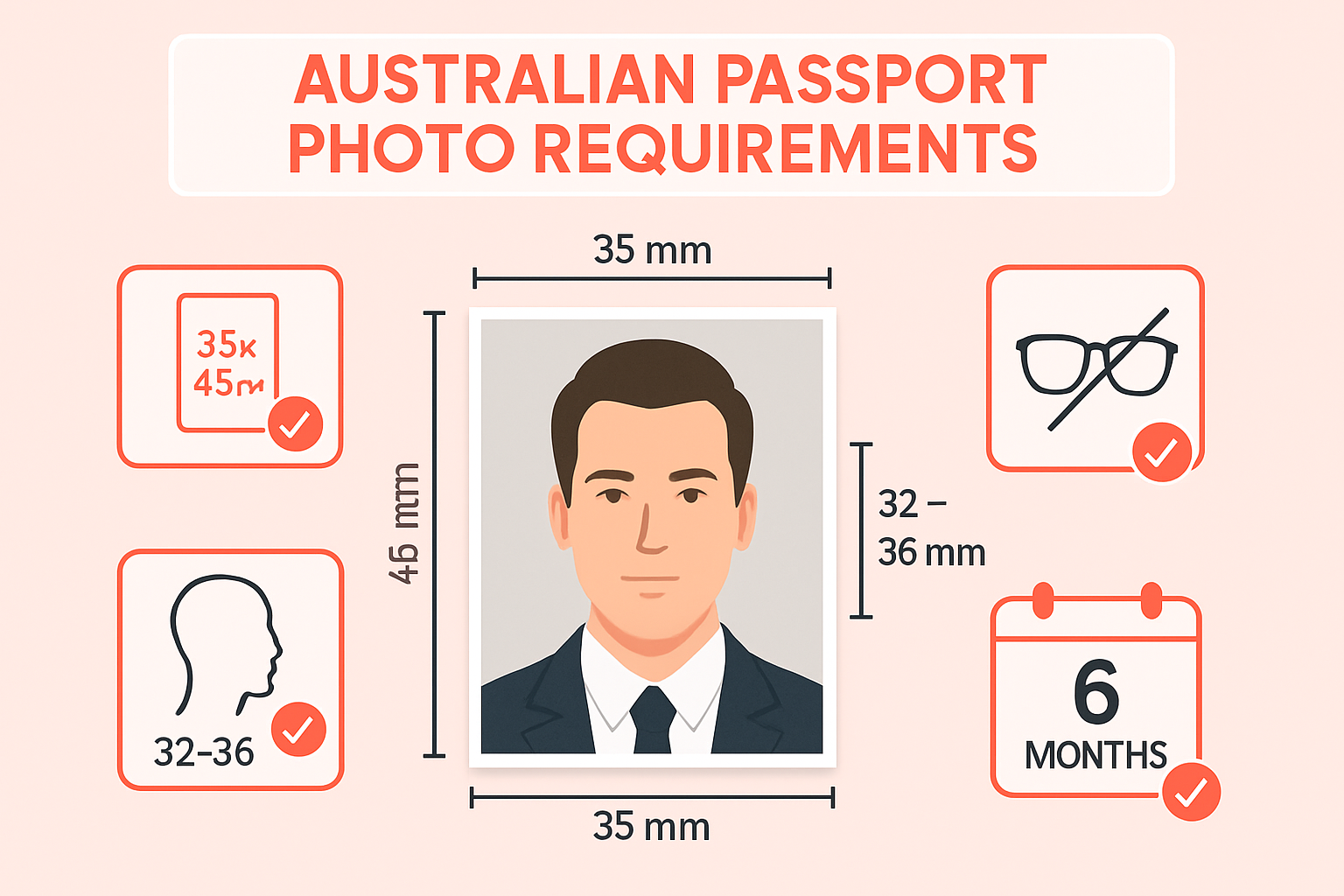
- 35mm wide × 45mm high (approximately 1.4 × 1.8 inches)
- Head height: 32-36mm (from chin to crown)
- Eye height: 25-30mm from bottom of photo
Background:
- Plain, light-colored background (white, cream, or light grey)
- No shadows on face or background
- No patterns, objects, or other people in background
Quality Standards:
- Clear, sharp focus
- Even lighting with no shadows
- Natural skin tones (no heavy filters)
- High resolution: minimum 600 × 750 pixels (more details below)
What to Wear
Clothing:
- Everyday clothing (no uniforms unless religious attire)
- Contrast with background (avoid white shirts on white background)
- No hats or head coverings (religious exceptions allowed if face is fully visible)
Accessories:
- Glasses: Allowed, but no tinted lenses, and frames must not cover your eyes
- Heavy frames may cause glare — if possible, take photo without glasses
- Jewelry: OK, but avoid anything that covers your face or neck
- Hearing aids: OK
Face & Expression
- Neutral expression or natural smile
- Eyes open, looking directly at camera
- Mouth closed
- No hair covering eyes or face
- No red-eye or glare
- Face fully visible from crown of head to chin, including both edges of face
Age-Specific Requirements
Adults: Standard requirements above
Children (under 10): Shoulders and top of head must be visible. Neutral expression preferred, but slight variation accepted if child is calm and facing camera.
Infants (under 1 year): Eyes open and looking at camera. Can be supported, but supporting person/object should not be visible in photo.
Digital Photo Requirements for Australia Visa
If you’re applying online (most common for US travelers), you’ll need a digital photo that meets these technical specs:
File Requirements:
- File format: JPEG (.jpg or .jpeg)
- File size: 60 KB to 5 MB
- Resolution: Minimum 600 × 750 pixels
- Color mode: Color (24-bit RGB) or grayscale
- Compression: JPEG compression ratio should not exceed 50:1
Common upload errors:
- File too small (under 60 KB) — increase quality/resolution
- File too large (over 5 MB) — compress or reduce resolution slightly
- Wrong aspect ratio — must be 35×45mm ratio (approximately 3:4)
- Face too small — head height must be 32-36mm of the 45mm total height
Australia Visa Photo vs US Passport Photo: What’s the Difference?
If you already have a US passport photo, can you use it for your Australia visa application? Not directly, but it can be adapted.
| Specification | Australia Visa | US Passport |
|---|---|---|
| Size | 35mm × 45mm | 2 × 2 inches (51 × 51mm) |
| Shape | Rectangle | Square |
| Head Height | 32-36mm | 25-35mm (1-1⅜ inches) |
| Background | Light-colored (white/cream/grey) | White or off-white |
| Glasses | Allowed (no tint, no glare) | Not allowed |
| Digital Min Resolution | 600 × 750 pixels | 600 × 600 pixels |
Key Differences:
- Size: Australia photo is rectangular (35×45mm), US is square (51×51mm)
- Glasses: Australia allows glasses; US does not (as of 2016)
- Head proportion: Australia requires larger head-to-photo ratio (32-36mm in 45mm height)
Can you crop a US passport photo to Australia size?
Possibly, but not guaranteed. The aspect ratio is different (Australia is taller), and the head height proportions differ. If your US photo has extra space at the top, cropping may work. Better to take a new photo specifically for Australia requirements.
Where to Get Australia Visa Photos in the USA
Option 1: Photo Studios ($15-30)
- CVS Photo Center: $16.99 (2 photos)
- Walgreens: $16.99 (2 photos)
- AAA (members): $10-15
- Professional photo studios: $20-30
Pros: Done quickly, printed on-site Cons: Expensive, staff may not know Australia-specific requirements, digital files often not included
Option 2: Online Tools ($1-15)
One Dollar Passport Photo (Recommended): $1
- Upload your own smartphone photo
- AI automatically crops to 35×45mm
- Background removal and replacement (white/cream/light grey)
- Digital file download (600×750 pixels, meets Australia Home Affairs specs)
- Printable 4×6 inch template (8 photos per sheet)
- Costs: $1 digital + $0.35 printing at CVS/Walgreens
How to use:
- Take photo with smartphone against any background
- Upload to One Dollar Passport Photo
- Select “Australia Visa” from document dropdown
- AI removes background, crops to 35×45mm, adjusts head height
- Download digital file (for online application)
- Download 4×6 inch print template
- Print at CVS/Walgreens for $0.35
Total cost: $1.35 (vs. $15-30 at a studio)
Other services:
- PhotoAiD: $14.95 (similar features, higher price)
- Passport Photo Online: $7.99
- Visafoto: $9.99
Option 3: DIY at Home (Free + $0.35 printing)
Requirements:
- Smartphone camera (8MP or higher)
- White wall or white sheet as background
- Natural lighting (near a window)
Steps:
- Set up near a window with natural light (avoid direct sunlight)
- Hang white sheet or stand against white wall
- Position camera at eye level, 1.2-1.5 meters away
- Have someone take the photo or use a timer/tripod
- Face camera directly, neutral expression, shoulders level
- Upload to One Dollar Passport Photo to auto-crop and format
Cost: Free photo + $1 processing + $0.35 printing = $1.35
How to Take Your Own Australia Visa Photo
Follow these steps for a compliant DIY photo:
Step 1: Setup (5 minutes)
- Location: Near a window with indirect natural light
- Background: White wall, white sheet, or white poster board
- Lighting: Soft, even lighting from the front (no shadows on face)
- Camera: Smartphone on a tripod or stable surface, eye level
Step 2: Positioning
- Stand 30cm (1 foot) away from background (prevents shadows)
- Camera should be 1.2-1.5 meters away from you
- Camera lens at your eye level
- Shoulders level, face camera directly
Step 3: Clothing & Appearance
- Wear clothing that contrasts with background (dark top works best)
- Remove glasses if possible (to avoid glare), or ensure no tint and frames don’t cover eyes
- No hats, headbands, or accessories covering face
- Hair pulled back if it covers eyes or face
Step 4: Expression & Pose
- Neutral expression or slight natural smile
- Look directly at camera
- Eyes open, mouth closed
- Relax shoulders
Step 5: Take Multiple Shots
- Take 5-10 photos (gives you options)
- Review for focus, lighting, shadows
- Ensure no red-eye, glare, or harsh shadows
Step 6: Auto-Process
- Upload best photo to One Dollar Passport Photo
- Select “Australia Visa” document type
- AI will:
- Remove background → pure white/light color
- Crop to 35×45mm
- Adjust head height to 32-36mm
- Generate digital file (600×750 pixels, JPEG, 60KB-5MB)
- Create 4×6 inch print template (8 photos per sheet)
Time: 10 minutes total Cost: $1 + $0.35 printing = $1.35
Common Australia Visa Photo Mistakes (and How to Avoid Them)
❌ Mistake 1: Using a US Passport Photo Without Adjustment
Problem: US passport photos are square (51×51mm), Australia requires rectangular (35×45mm). Head proportions differ.
Solution: Take a new photo or crop using a tool that adjusts for Australia specs.
❌ Mistake 2: Wearing Glasses with Tinted Lenses or Heavy Glare
Problem: While glasses are allowed, tinted lenses are not, and glare can obscure your eyes.
Solution: Remove glasses entirely, or ensure they have clear lenses and are positioned to avoid flash reflection.
❌ Mistake 3: File Size Too Small or Too Large
Problem: Australia visa system rejects files under 60 KB or over 5 MB.
Solution: Check file size before upload. If too small, increase quality settings when exporting JPEG. If too large, use JPEG compression or reduce resolution slightly (but stay above 600×750 pixels).
❌ Mistake 4: Head Too Small in Photo
Problem: Head height must be 32-36mm out of the 45mm total height (roughly 71-80% of image). If head is too small, photo is rejected.
Solution: Stand closer to camera, or use an auto-cropping tool that adjusts head height proportions.
❌ Mistake 5: Shadows on Face or Background
Problem: Uneven lighting creates shadows, which violate photo requirements.
Solution: Use soft, diffused lighting from the front. Avoid direct overhead lights or flash. Natural window light works best.
❌ Mistake 6: Busy or Patterned Background
Problem: Background must be plain, light-colored. Patterns, furniture, or other people cause rejection.
Solution: Use a white wall or white sheet. Or, use a background removal tool to replace with pure white.
❌ Mistake 7: Photo Taken More Than 6 Months Ago
Problem: Photo must be recent (within 6 months) and resemble your current appearance.
Solution: Take a fresh photo if your appearance has changed significantly (haircut, facial hair, weight change, etc.).
Australia Visa Types That Require Photos
Not all Australia visas require a separate photo. Here’s a breakdown:
No Photo Required
- ETA (Electronic Travel Authority) — subclass 601: For tourists and business visitors from eligible countries (including USA). No photo upload needed; uses passport photo.
- eVisitor — subclass 651: For tourists and business visitors from eligible European countries. No photo upload needed.
Photo Required
- Visitor visa — subclass 600: Tourist, business, or family visit (when ETA not available). Requires digital photo upload.
- Student visa — subclass 500: Requires digital photo meeting specifications above.
- Temporary Skill Shortage visa — subclass 482: Work visa. Requires digital photo.
- Skilled Independent visa — subclass 189: Permanent residency pathway. Requires digital photo.
- Partner visa — subclass 820/801: Requires digital photo for both applicant and sponsor.
- Working Holiday visa — subclass 417: Requires digital photo.
For US citizens visiting Australia for tourism or business: Most will apply for ETA (no photo needed). If applying for a standard Visitor visa (subclass 600), a compliant digital photo is required.
Uploading Your Photo: Step-by-Step
Once you have your digital photo file, uploading to the Australia Home Affairs online application (ImmiAccount) is straightforward.
Before You Upload
Double-check:
- File format: JPEG (.jpg or .jpeg)
- File size: Between 60 KB and 5 MB
- Resolution: At least 600 × 750 pixels
- Aspect ratio: 35×45mm (roughly 3:4)
- Background: Light-colored, no shadows
- Face: Head height 32-36mm, neutral expression, no glasses glare
Upload Process
- Log in to your ImmiAccount at www.homeaffairs.gov.au
- Start or continue your visa application
- Navigate to “Attach documents” section
- Select “Passport photograph”
- Click “Browse” and select your JPEG file
- Upload (system will validate file size and format)
- If rejected, check error message and adjust file accordingly
Common upload errors:
- “File size too large” → Compress JPEG or reduce resolution
- “Invalid file format” → Ensure it’s .jpg or .jpeg (not .png or .heic)
- “Image quality too low” → Increase resolution to at least 600×750 pixels
Frequently Asked Questions
Can I wear glasses in my Australia visa photo?
Yes, glasses are allowed for Australia visa photos, but they must have clear lenses (no tint), and there should be no glare obscuring your eyes. Frames should not cover your eyes. If possible, it’s safer to take the photo without glasses to avoid any rejection.
Is the Australia visa photo the same as the Australian passport photo?
Yes, the specifications are identical. Both require 35×45mm size, light background, and head height of 32-36mm.
Can I use my US passport photo for an Australia visa?
Not directly. US passport photos are 51×51mm square, while Australia requires 35×45mm rectangular. The aspect ratio and head proportions differ. You can take a new photo or use a tool that crops and adjusts US photos to Australia specs.
Do I need a printed photo or just a digital file?
For online applications (most common), you only need a digital file (JPEG, 600×750 pixels minimum). For paper applications submitted in person, you need a printed 35×45mm photo.
How many photos do I need for an Australia visa application?
For online applications: 1 digital file. For paper applications: Usually 2 printed photos (but check your specific visa subclass requirements).
Can I take my own Australia visa photo at home?
Yes. Use a smartphone against a white background with natural lighting, then upload to an auto-cropping tool like One Dollar Passport Photo to format it correctly.
What if my photo is rejected during the application?
The ImmiAccount system will display an error message explaining the issue (file size, format, quality, etc.). Fix the problem (compress file, adjust format, retake photo), then re-upload.
How recent does my Australia visa photo need to be?
The photo must be taken within the last 6 months and resemble your current appearance.
Can infants and children use the same photo specs?
Yes, the same size and format requirements apply. For infants, eyes should be open and facing camera. Supporting person/objects should not be visible in the photo.
Do I need a professional photographer?
No. A smartphone camera with 8MP or higher resolution is sufficient. Many applicants successfully use DIY photos processed through online tools.
Get Your Australia Visa Photo Now
Don’t pay $15-30 at a photo studio for a visa photo. Take your own photo with a smartphone and get it formatted correctly for $1.
Create Your Australia Visa Photo →
What you get:
- AI background removal (perfect white/light background)
- Auto-crop to 35×45mm
- Head height adjustment (32-36mm)
- Digital file download (600×750 pixels, JPEG, ready to upload)
- Printable template (4×6 inch, 8 photos per sheet)
Cost: $1 digital file + $0.35 printing at CVS/Walgreens = $1.35 total
Time: 1 minute to upload, instant download
Whether you’re applying for a Visitor visa (subclass 600), Student visa, Work visa, or any other Australia visa, you’ll have a compliant photo ready to upload in under 2 minutes.
Ready to create your passport photo?
Get a compliant photo in 2 minutes for just $1. No signup required.