Australian Passport Photo Requirements: Complete Size & Rules Guide (2026)
Official Australian passport photo requirements: 35×45mm size, white or light grey background, no glasses allowed. Get the exact specs for print & digital photos.
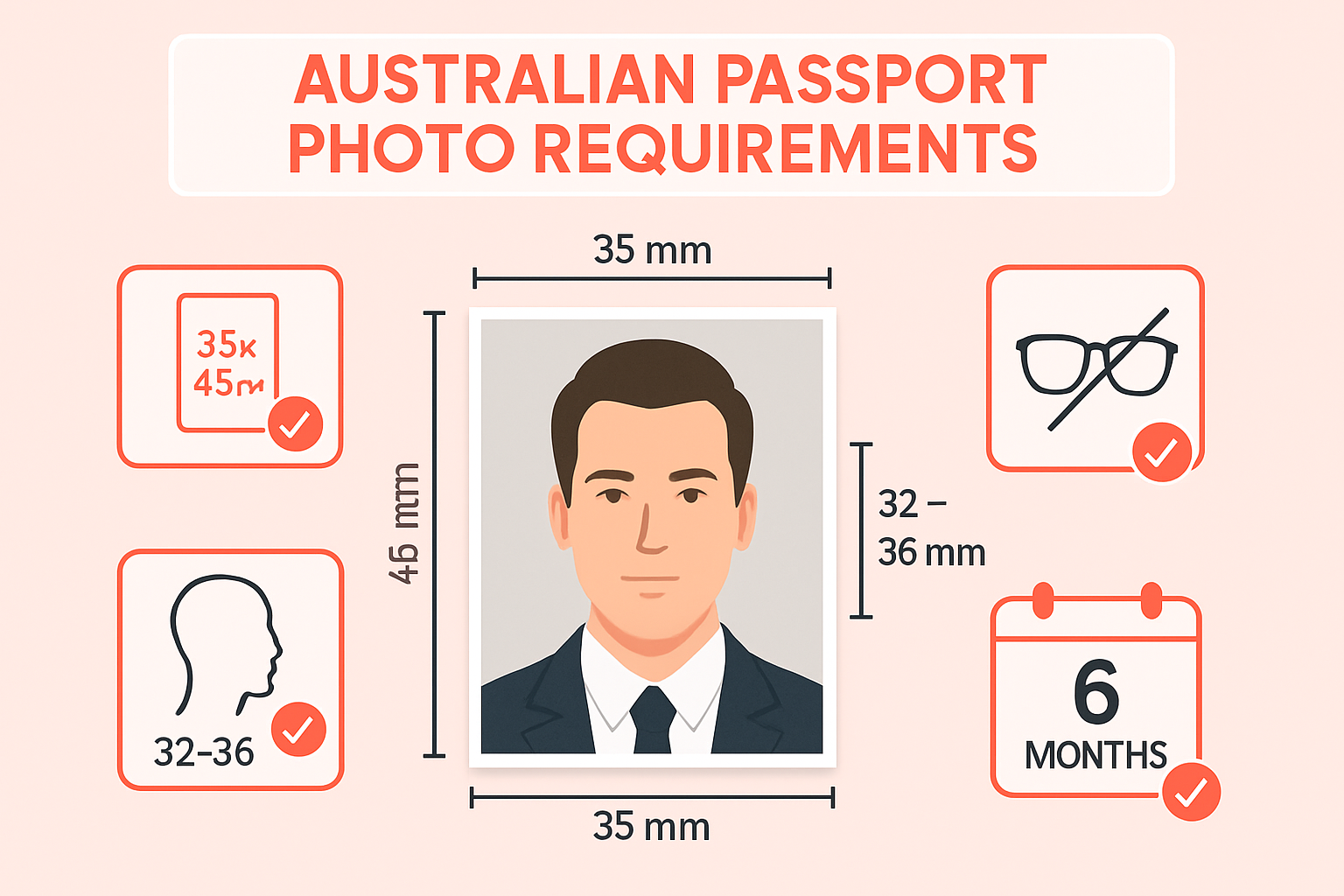
Need an Australian passport photo? Whether you’re applying for a new passport, renewing an existing one, or living abroad and need compliant photos, this guide covers everything you need to know about Australian passport photo requirements in 2026.
Australian passport photos follow the standard 35×45mm European format. Getting the size wrong is one of the most common reasons applications get delayed.
Australian Passport Photo Size
The official size requirements for Australian passport photos are:
- Width: 35-40mm (standard: 35mm)
- Height: 45-50mm (standard: 45mm)
- Head height: 32mm to 36mm (chin to crown)
- Eye position: Between 28mm and 35mm from the bottom of the photo
This rectangular format must be followed precisely for your application to be accepted.
Head Size Requirements
Your face must take up a specific portion of the photo:
- Chin to crown: 32mm to 36mm (about 70-80% of the photo height)
- Face centered: Equal space on left and right sides
- Top of head: Small gap between crown and top edge of photo
If your face is too small or too large in the frame, your photo will be rejected. This is one of the trickiest requirements to get right when taking photos at home.
Background Requirements
Australian passport photos must have a plain white or light grey background.
Acceptable Backgrounds
✅ Plain white (pure white, #FFFFFF) ✅ Light grey (neutral grey, no tint) ✅ Off-white (very light cream)
Unacceptable Backgrounds
❌ Dark grey or charcoal ❌ Colored backgrounds (blue, beige, etc.) ❌ Patterned or textured backgrounds ❌ Backgrounds with visible shadows ❌ Backgrounds with other objects
The background must contrast with your face — if you have very pale skin, a light grey background may actually work better than pure white.
Expression & Pose Rules
Australian passport photos have strict requirements for your expression and pose:
Expression
- Neutral expression — no smiling
- Mouth closed (for anyone over 3 years old)
- Both eyes open and clearly visible
- Looking directly at the camera
Head Position
- Face the camera straight on
- No tilting or turning your head
- Keep your chin level (not up or down)
- Both ears should be visible (though hair can cover them)
What to Avoid
❌ Smiling — Even a slight smile can cause rejection ❌ Squinting — Both eyes must be fully open ❌ Looking away — Your gaze must be straight at the camera ❌ Raised eyebrows — Keep a natural, relaxed expression
Glasses Rules: Not Allowed
As of recent years, glasses are not permitted in Australian passport photos. This applies to:
- Prescription glasses
- Reading glasses
- Tinted glasses
- Sunglasses
- Any eyewear
Medical Exceptions
If you cannot remove your glasses due to a medical condition, you must:
- Provide a medical certificate from your doctor, OR
- Complete a declaration form explaining why you cannot remove them
Even with a medical exemption, your glasses must not have:
- Tinted lenses
- Heavy frames that obscure your eyes
- Glare or reflections
Pro tip: If you wear glasses regularly, practice your neutral expression without them before taking your photo. The unfamiliar feeling of having no glasses can sometimes cause awkward expressions.
Clothing & Head Coverings
What to Wear
- Normal, everyday clothing
- Avoid pure white (blends with background)
- Solid, darker colors work best
- Collared shirts and professional attire are fine
What Not to Wear
❌ Hats or caps — Not allowed ❌ Head coverings (except religious/medical) ❌ Sunglasses or tinted glasses ❌ Headphones or earbuds
Religious Head Coverings
Religious head coverings (hijab, turban, kippah, etc.) are permitted if:
- Your full face is visible from chin to forehead
- No shadows are cast on your face
- The covering doesn’t obscure any facial features
You may be asked to provide a statutory declaration confirming you wear the covering for religious reasons.
Digital Photo Requirements
If you’re applying for an Australian passport online, your digital photo must meet these technical specifications:
File Specifications
| Requirement | Specification |
|---|---|
| File format | JPEG (.jpg) |
| Minimum size | 600×800 pixels |
| Recommended size | 1200×1600 pixels |
| Maximum file size | 3.5MB (3584KB) |
| Color mode | RGB color |
Quality Requirements
- Photo must be in focus — no blur
- Natural skin tones — no color cast
- No red-eye correction visible
- No digital editing or filters
- No retouching of facial features
The Australian Passport Office specifically prohibits:
- Removing moles, scars, or wrinkles
- Altering skin texture or tone
- Using beauty filters or smoothing effects
- Any AI enhancement that changes your appearance
Where to Get Australian Passport Photos
In Australia
Photo Studios
- Most shopping center photo studios
- Australia Post offices (many locations)
- RACV/RACQ member services
- Some newsagents with photo services
Typical prices in Australia:
- Photo studios: $15-25 AUD for 4 photos
- Australia Post: $19.95 AUD (official partner)
- Instant photo booths: $15-20 AUD
Outside Australia
If you’re applying from overseas, options include:
- One Dollar Passport Photo — Select Australia, get 35×45mm format
- Australian embassy or consulate services
- Professional photographers (request 35×45mm specifically)
- Local photo services that offer international formats
Note that many standard photo services don’t offer Australian passport size by default, so you’ll need a service that specifically supports 35×45mm.
Taking Your Own Australian Passport Photo
You can take your own passport photo at home if you follow these guidelines:
Setup Requirements
-
Background: Use a plain white or light grey wall
- A white sheet or large paper works as a backdrop
- Avoid textured walls or wallpaper
-
Lighting: Natural daylight is best
- Face a window for even lighting
- Avoid direct sunlight (causes harsh shadows)
- No flash (can cause red-eye and uneven lighting)
-
Camera Position:
- Camera at eye level
- 1-2 meters (3-6 feet) away
- Use the back camera of your phone (higher quality)
-
Tripod or Helper:
- Use a phone tripod with timer, OR
- Have someone else take the photo
Common DIY Mistakes
❌ Selfies — Too close, wrong angle, usually rejected ❌ Using front camera — Lower quality than back camera ❌ Indoor lighting only — Usually too yellow or dim ❌ Flash photos — Creates shadows and red-eye ❌ Cropped group photos — Wrong framing and resolution
Process Your Photo
After taking your photo:
- Upload to One Dollar Passport Photo
- Select “Australia” → “Passport”
- Our AI automatically:
- Adjusts to 35×45mm
- Removes/corrects background
- Checks head size and positioning
- Verifies all requirements
- Download digital version or print template
Common Rejection Reasons
Australian passport photos are rejected for several common reasons. Avoid these mistakes:
1. Wrong Size or Framing
- Photo not 35×45mm
- Head too large or too small
- Face not centered
2. Background Issues
- Not plain white or light grey
- Shadows on background
- Patterns or textures visible
- Objects in background
3. Expression Problems
- Smiling or mouth open
- Eyes not fully open
- Looking away from camera
- Raised eyebrows
4. Glasses
- Wearing any type of glasses
- Sunglasses or tinted lenses
- Glare from lenses
5. Technical Quality
- Blurry or out of focus
- Poor lighting
- Over or underexposed
- Red-eye visible
6. Digital Editing
- Filtered or retouched
- Moles/scars removed
- Skin smoothing applied
- Color corrections that alter appearance
7. Photo Too Old
- Must be taken within 6 months
- Must represent current appearance
Children’s Passport Photos
Baby and children’s passport photos follow the same 35×45mm format, with a few accommodations:
For Babies Under 1 Year
- Eyes must be open
- Mouth can be slightly open (hard to control)
- No toys, pacifiers, or other objects
- Only the child in the photo
- Can be photographed lying down with white backdrop underneath
For Children 1-3 Years
- Eyes must be open
- Mouth can be slightly open
- Neutral expression encouraged but some tolerance
- No hands near face
For Children Over 3 Years
- Same rules as adults apply
- Neutral expression required
- Mouth must be closed
- Both eyes fully open
Tips for photographing young children:
- Natural light during their best mood time
- Have a helper behind the camera to get their attention
- Take many photos — you only need one good one
- For babies: lay them on a white sheet and photograph from above
Passport Photo vs Other Australian ID Photos
Different Australian documents have slightly different photo requirements:
| Document | Size | Background | Glasses |
|---|---|---|---|
| Passport | 35×45mm | White/light grey | No |
| Driver’s License | Varies by state | Usually grey | Usually yes |
| Proof of Age Card | 35×45mm | Varies | Varies |
| Citizenship Certificate | 45×35mm | White | No |
If you need photos for multiple documents, it’s usually easiest to get compliant passport photos — they’re the strictest standard and often acceptable for other documents.
Frequently Asked Questions
What size is an Australian passport photo?
Australian passport photos must be 35mm wide × 45mm high (or up to 40×50mm). Your face should measure 32-36mm from chin to crown.
Can I wear glasses in my Australian passport photo?
No. Glasses are not allowed in Australian passport photos. If you cannot remove glasses for medical reasons, you need a medical certificate or must complete a declaration form.
What background color is required?
The background must be plain white or light grey with no patterns, shadows, or textures. It should contrast with your face.
How long is an Australian passport photo valid?
Australian passport photos must be taken within the last 6 months and must accurately represent your current appearance. If you’ve significantly changed your appearance (new hairstyle, weight change, etc.), get a new photo.
Can I smile in my Australian passport photo?
No. You must have a neutral expression with your mouth closed and both eyes open. Even a slight smile can cause rejection.
How much do Australian passport photos cost?
In Australia, expect to pay $15-25 AUD for professional photos. At Australia Post, photos cost $19.95 AUD. Using One Dollar Passport Photo costs just $1 USD for digital download, plus printing costs at any photo printer.
Where can I get Australian passport photos outside Australia?
Many standard photo services only offer their local passport photo sizes. Use One Dollar Passport Photo to create correct 35×45mm photos, then print at any photo service. Alternatively, contact Australian consulates or international photo studios that offer various passport formats.
Get Your Australian Passport Photo
Need a compliant Australian passport photo? One Dollar Passport Photo makes it easy:
- Take a photo with your phone
- Select Australia → Passport
- Our AI adjusts to 35×45mm and checks all requirements
- Download your digital photo or print template
Works worldwide — perfect for Australians abroad or anyone applying for an Australian visa.
Ready to create your passport photo?
Get a compliant photo in 2 minutes for just $1. No signup required.