2×2 Photo Guide: What It's Used For & How to Make One
The 2x2 inch photo is required for US passports, visas, green cards, and more. Learn exactly what documents need this specific size and how to create compliant photos at home.
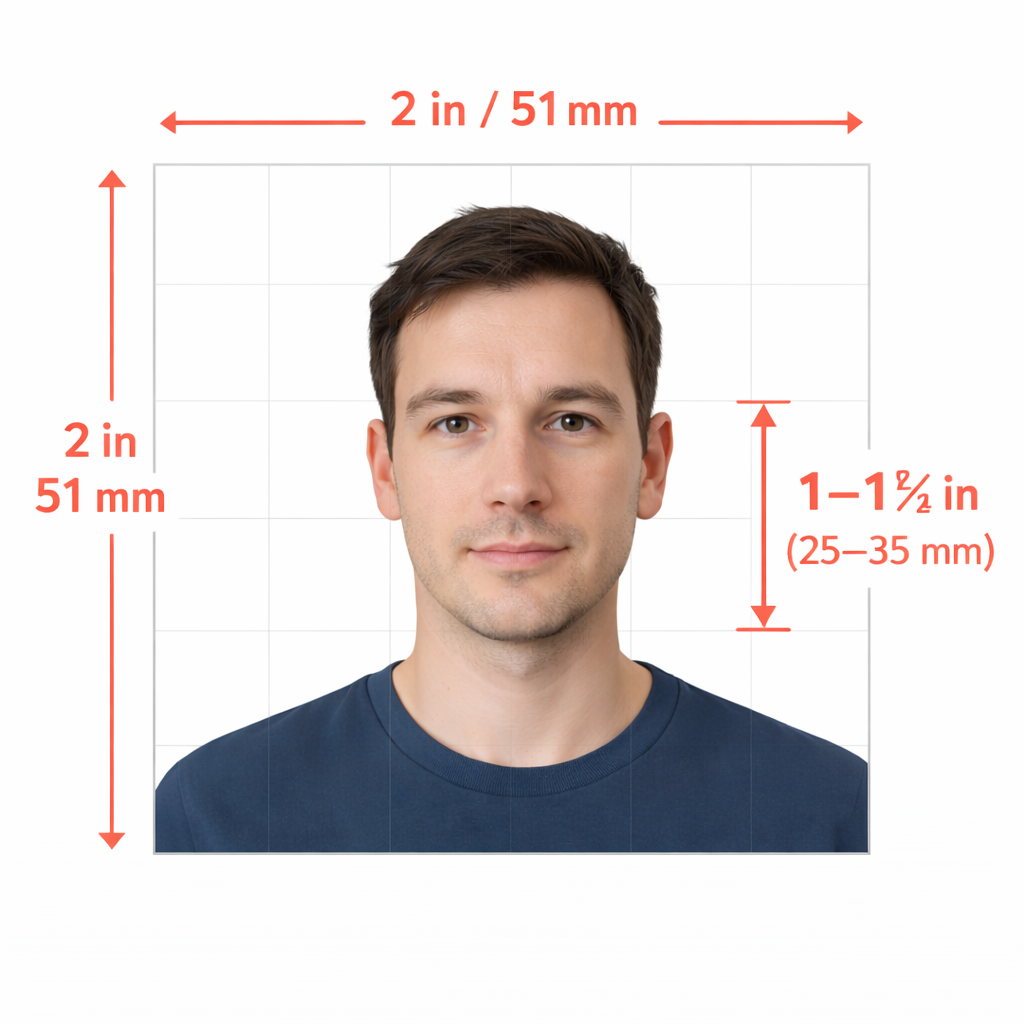
The 2×2 inch photo is one of the most universally required document photo sizes in the United States. Whether you’re applying for your first passport, renewing your green card, or filing immigration paperwork, chances are you’ll need this exact size.
But here’s what most people don’t realize: the “2×2 photo” isn’t just about dimensions. There are specific requirements for head size, background color, lighting, and even your facial expression. Get any of these wrong, and your application gets rejected—costing you time, money, and frustration.
This guide covers everything you need to know about 2×2 photos: what they’re used for, the exact specifications, and how to create compliant photos without overpaying at a drugstore.
What Is a 2×2 Photo?
A 2×2 photo (also written as 2x2 inch photo) is a square photograph measuring exactly 2 inches by 2 inches (51mm × 51mm). This standardized size is mandated by the U.S. Department of State for passports and by USCIS for immigration documents.
The 2×2 format allows for consistent facial recognition across millions of documents while providing enough detail for identification purposes. It’s become the de facto standard for official U.S. identification photos.
Official Uses for 2×2 Photos
Here’s a comprehensive breakdown of every document and application that requires the standard 2×2 inch photo:
U.S. Passport Applications
| Document Type | Photos Required | Notes |
|---|---|---|
| New adult passport (DS-11) | 1 photo | Must be taken within last 6 months |
| Passport renewal (DS-82) | 1 photo | Paper applications only |
| Child’s passport (DS-11) | 1 photo | Special rules for infants |
| Passport card | 1 photo | Same requirements as passport book |
The State Department is very clear: your passport photo must be exactly 2×2 inches, printed on matte or glossy photo-quality paper. The photo cannot be digitally altered using filters, AI, or image editing software.
USCIS Immigration Forms
These USCIS forms require 2×2 passport-style photos:
| Form Number | Purpose | Photos Required |
|---|---|---|
| I-485 | Adjustment of Status (Green Card) | 2 photos |
| I-765 | Employment Authorization Document | 2 photos |
| I-90 | Green Card Renewal/Replacement | 2 photos |
| N-400 | Naturalization Application | 2 photos |
| I-130 | Petition for Alien Relative | 2 photos |
| I-129F | Fiancé(e) Visa Petition | 2 photos |
| I-751 | Remove Conditions on Residence | 2 photos |
| I-821 | Temporary Protected Status | 2 photos |
Important: USCIS requires that photos be identical. If you’re submitting two photos, they should be from the same photo session, not taken at different times.
U.S. Visa Applications
Whether you’re applying for a tourist visa, student visa, or work visa, you’ll need a 2×2 photo:
- Nonimmigrant visas (DS-160): Digital upload required, plus some embassies request a printed photo at the interview
- Immigrant visas (DS-260): Two identical 2×2 printed photos required at interview
- Diversity Visa (DV) lottery: Digital submission (600×600 pixels), then two printed photos if selected
Other Documents Requiring 2×2 Photos
Beyond passports and immigration, you may need 2×2 photos for:
- Global Entry/TSA PreCheck applications
- NEXUS and SENTRI trusted traveler programs
- Some state ID cards (though many use different sizes)
- Professional certifications in certain industries
- School and university applications (international student documents)
Exact Specifications for 2×2 Photos
Getting your photo rejected wastes time and money. Here are the exact requirements set by the State Department and USCIS:
Size Requirements
- Print size: 2×2 inches (51×51 mm)
- Head height: 1 inch to 1⅜ inches (25-35mm) from chin to top of head
- Head position: Centered horizontally, with eyes between 1⅛ and 1⅜ inches from bottom
Photo Quality Standards
- Color: Full color only (no black and white)
- Background: Plain white or off-white, no patterns or shadows
- Paper: Matte or glossy photo-quality paper
- Resolution: High resolution, not blurry, grainy, or pixelated
- Age: Taken within the last 6 months
Pose and Expression Requirements
- Face position: Directly facing camera, no tilting
- Expression: Neutral, mouth closed
- Eyes: Both eyes open and clearly visible
- Glasses: Not allowed (medical exceptions require doctor’s note)
- Headwear: Not allowed unless for religious purposes (requires signed statement)
Common Rejection Reasons
Your 2×2 photo may be rejected if:
- Head size is too large or too small
- Shadows appear on face or background
- Photo is overexposed or underexposed
- Eyeglasses are worn
- Expression shows teeth or isn’t neutral
- Photo was digitally altered or filtered
- Background isn’t plain white/off-white
- Photo is a photocopy or digitally scanned from another document
How to Make Your Own 2×2 Photo
You don’t need to pay $15-20 at a pharmacy or post office. With the right approach, you can create compliant 2×2 photos at home for under a dollar.
What You’ll Need
- A smartphone with a decent camera (most phones from the last 5 years work fine)
- A plain white wall or white sheet as background
- Natural daylight or soft indoor lighting
- A way to print (home printer with photo paper, or upload to a print service)
Step-by-Step Instructions
1. Set Up Your Background
Find a plain white or off-white wall. If you don’t have one, hang a white bedsheet or poster board. Make sure there are no visible textures, patterns, or shadows on the background.
2. Position Your Lighting
Natural daylight from a window works best. Face the window so light falls evenly on your face—no harsh shadows under your nose or chin. Avoid direct sunlight, which creates harsh shadows.
If using indoor lighting, position two light sources at 45-degree angles to your face. This eliminates shadows while providing even illumination.
3. Set Up Your Camera
- Use the rear camera (higher quality than selfie camera)
- Have someone else take the photo, or use a tripod with timer
- Position camera at eye level
- Keep camera 4-6 feet away from your face
- Turn off beauty filters or portrait mode
4. Take the Photo
- Look directly at the camera
- Keep a neutral expression with mouth closed
- Ensure both eyes are open
- Remove glasses, hats, and headphones
- Keep shoulders relaxed and visible
Take multiple shots so you have options to choose from.
5. Format and Print
This is where most people make mistakes. Your photo needs to be:
- Cropped to a perfect square
- Sized so your head measures 1-1⅜ inches when printed
- Exported at high resolution (at least 600×600 pixels)
The easiest way to ensure compliance? Use our free passport photo tool to automatically crop, resize, and verify your photo meets all requirements. Upload your selfie, and we’ll handle the technical formatting—then you can print it at any drugstore for pennies.
Printing Options
At home: Use glossy photo paper (4×6 sheets work well—you can fit multiple 2×2 photos on one sheet). Make sure your printer is set to “photo” or “high quality” mode.
At a store: Upload your formatted file to Walgreens, CVS, or Walmart photo services. A single 4×6 print costs around $0.35-0.50 and can contain multiple passport photos.
Using our service: One Dollar Passport Photo delivers print-ready files optimized for any printing service, guaranteed to meet official requirements.
Digital vs. Printed 2×2 Photos
Some applications require digital uploads while others need physical prints. Here’s how the requirements differ:
Digital Photo Specifications
For online applications (like DS-160 visa forms or DV lottery entries):
- File format: JPEG (.jpg)
- Dimensions: 600×600 pixels
- File size: Under 240KB
- Aspect ratio: Square (1:1)
When You Need Prints
Physical 2×2 prints are required for:
- Paper passport applications (DS-11, DS-82)
- USCIS in-person appointments
- Immigrant visa interviews
- Some embassy appointments
Pro tip: Always bring printed photos to immigration appointments even if you submitted digital copies. Officers sometimes request physical photos on the spot.
Special Situations
Baby and Infant Photos
Taking passport photos of babies is tricky but doable:
- Lay the baby on a white sheet, facing up
- Ensure their eyes are open (it’s okay if baby’s eyes aren’t fully open)
- No pacifiers, toys, or hands visible
- The baby must be the only person in the photo
Babies and toddlers can have a parent’s hands supporting them, but the hands cannot be visible in the final cropped photo.
Religious Head Coverings
If you wear a head covering daily for religious reasons:
- The covering is allowed in your photo
- Your full face must still be visible (forehead to chin)
- No shadows from the covering on your face
- Submit a signed statement confirming it’s worn daily for religious purposes
Medical Exceptions
If you cannot remove eyeglasses for medical reasons:
- Submit a signed doctor’s note explaining the medical necessity
- Ensure frames don’t cover your eyes
- No glare or reflections on lenses
- No shadows from the frames
How Much Should a 2×2 Photo Cost?
Here’s what you’ll typically pay:
| Option | Cost | Time |
|---|---|---|
| CVS/Walgreens | $16.99 | Same day |
| Post Office | $15.00 | Same day |
| AAA (members) | $10-15 | Same day |
| DIY at home | $0.35-0.50 | Print time |
| One Dollar Passport Photo | $1.00 | Instant |
The “professional” options charge a premium for convenience, but there’s no quality difference. Your iPhone and a white wall can produce the exact same result—if you format it correctly.
That’s why we built One Dollar Passport Photo. Upload any photo, and our system automatically checks compliance, crops to the right dimensions, and delivers a print-ready file. For one dollar. Try it now →
FAQ
Can I smile in my 2×2 photo?
No. Both the State Department and USCIS require a neutral expression with your mouth closed. A slight, natural smile is sometimes accepted, but showing teeth will get your photo rejected.
Do I have to remove my glasses?
Yes. As of 2016, the State Department no longer allows glasses in passport and visa photos. The only exception is if you cannot remove them for medical reasons—and you’ll need a doctor’s note.
Can I wear makeup in my passport photo?
Yes, normal everyday makeup is fine. However, avoid dramatic looks that significantly alter your appearance (heavy contouring, dramatic false lashes, etc.). The goal is for you to look like yourself.
How recent does my 2×2 photo need to be?
Photos must be taken within the last 6 months. If your appearance has changed significantly (major weight change, facial surgery, new large tattoos), you’ll need a new photo even if it’s technically within 6 months.
What if my photo gets rejected?
You’ll need to submit a new photo. This delays processing by however long it takes to resubmit. For passport applications, this can add weeks. For USCIS applications, you may receive a Request for Evidence (RFE), adding months to your case.
Avoid rejection by using our compliance checker before you print.
Can I use the same photo for multiple applications?
Yes, if all photos are from the same session and meet the 6-month requirement. Many people order multiple copies for passport and USCIS applications simultaneously.
Is the 2×2 photo size used outside the U.S.?
The 2×2 inch (51×51mm) size is primarily a U.S. standard. Other countries have different requirements—Canada uses 50×70mm, UK uses 35×45mm, and Schengen countries use 35×45mm. Always verify requirements for your specific destination.
Need a compliant 2×2 photo without the hassle? Upload your photo now and get a print-ready file in seconds—guaranteed to meet U.S. passport and visa requirements.
Ready to create your passport photo?
Get a compliant photo in 2 minutes for just $1. No signup required.